
Employee Engagement
The Visibility Tax: Rolling Out Productivity Tracking Software Without Hurting Morale
How to deploy productivity tracking software without damaging team culture. Discover strategies for transparent monitoring that boosts output and morale.

Nishant Tandon
Co-founder & Lead Partner, Razor Infotech · 13 min read · · Updated
Most rollouts of productivity tracking software fail on the first day, not because the numbers are wrong, but because nobody told the people being measured what the measurement was for. The tool gets installed. A quiet dread settles over the team. And within a week, the smartest thing your best engineer does is learn to look busy instead of being useful. Teams consistently find that dread do more damage to output than any missed deadline.
There is a hidden cost that almost no vendor deck mentions. Call it the visibility tax: the hours your strongest people burn performing effort for the dashboard instead of doing the work. A developer stays online until 8 PM not because the ticket needs it, but because logging off early might read as slacking. A support agent keeps a spreadsheet open to keep the cursor moving. None of this shows up as a line item, yet it silently degrades exactly the discretionary effort you were hoping to grow. The goal of any sane tracking rollout is to lower that tax, not raise it.
This article is about how to deploy productivity analytics so that clarity goes up and the visibility tax goes down. Not surveillance. Not keystroke theatre. Workflow visibility that the person being tracked would actually defend.
Beyond the Stopwatch: Time Tracking Is Not Productivity Tracking
The two get used interchangeably, and that confusion is where morale problems start.
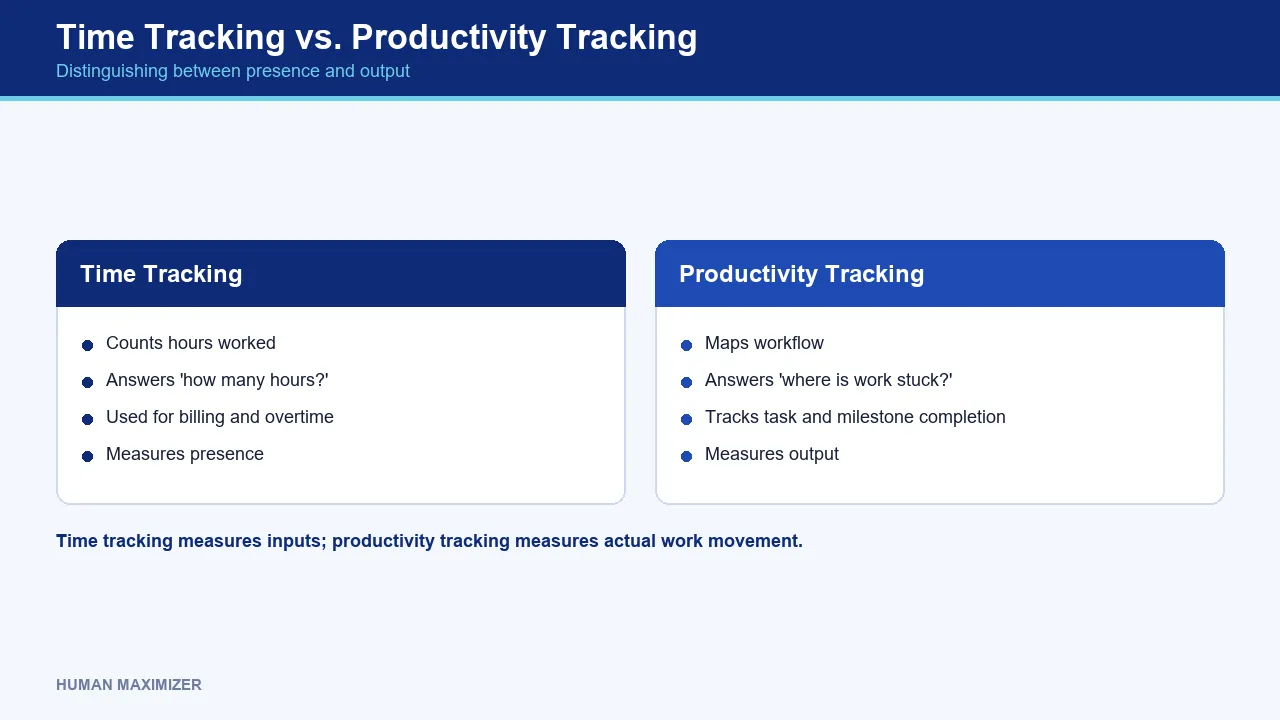
Time tracking answers a narrow question: how many hours went against this client, this project, this shift? It is a clock. It is genuinely useful for agencies billing by the hour, for statutory overtime records, for shift-based operations where hours worked is the deliverable.
Productivity tracking asks a different question: where is the work actually stuck? It looks at task completion, milestone progression, and where handoffs stall between stages. Hours are an input. Whether the work moved is the output. A team can log a flawless forty-hour week and ship nothing, and a stopwatch will never tell you that.
Here is the practical line we draw. Time tracking counts presence. Productivity analytics maps flow. When you blur them, you get the worst of both worlds: a tool that punishes the quiet architect who thinks for three hours and rewards the person refreshing tabs. Any measure that scores thinking by motion will reliably promote the wrong behaviour.
The Indian Context: Legal, Ethical, and Privacy Boundaries
Monitoring in the Indian workplace sits on a psychological contract that is easy to break and slow to rebuild. The cultural fear here is specific: employees read tracking as a signal that management assumes they are cheating. Once that reading takes hold, misused monitoring undermines morale rather than lifting output, and the productivity gains you projected quietly reverse.
The legal ground is also shifting. The Digital Personal Data Protection Act, 2023 treats employee activity data as personal data, which means purpose limitation and reasonable notice are not optional courtesies. You can read the official framing of the Act on the MeitY site. The safe operating principle is simple: collect the minimum you need for a stated purpose, tell people what you collect, and never gather what you cannot justify to the person it describes.
That is why the design of the tool matters as much as the policy around it. A system that captures keystroke counts but never keystroke text, that never triggers a screenshot on its own, and that keeps any top-words view to a rolling top-N so no sentence can be reconstructed, is architecturally easier to defend than one that hoovers up everything and asks forgiveness later. Consent is not a checkbox you win once. It is a boundary you keep proving you respect.
Curious how this looks when it is built as a boundary rather than a bolt-on? See it live.
Essential Features for Workforce Optimization
If the purpose is clarity, the feature list narrows fast. You do not need everything the sales deck offers. You need the handful of signals that help a manager unblock work.
Signals that map flow, not presence
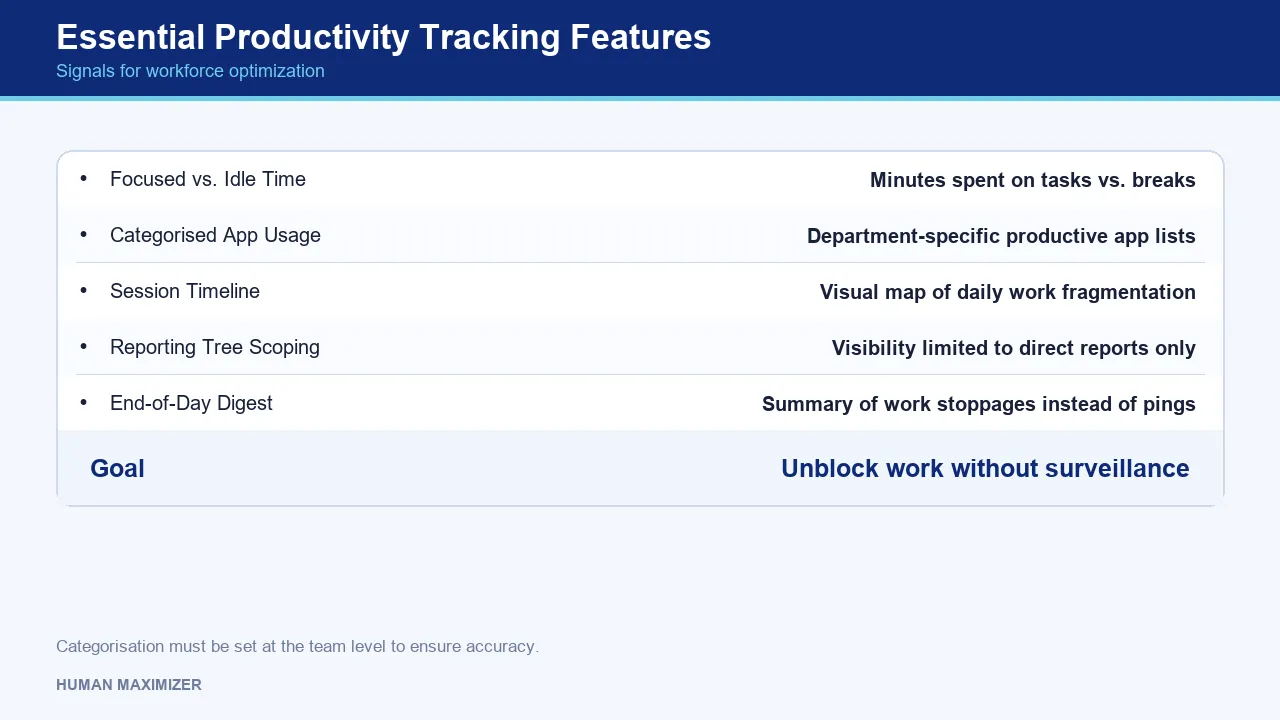
The tiles worth having tell you what a day actually looked like: focused work minutes versus idle and break minutes, app and website time categorised against a department-level productive list, and a timeline of sessions so a manager can see where the day fragmented. The department nuance matters more than it sounds. Slack is productive for a support desk and a distraction on an assembly line, so a single company-wide "productive apps" list produces a meaningless percentage. Categorisation has to live at the team level or the headline KPI lies to everyone.
Rollups that respect the reporting tree
A manager should see their direct reports and nothing beyond. Cross-team reads should require an explicit, logged permission, not a default. When visibility is scoped to the reporting line and every wider read is audited, the tool stops feeling like a panopticon and starts feeling like a status board.
Stoppage signals over minute-by-minute noise
One low-noise end-of-day digest telling a lead that an agent went dark is far more useful, and far less corrosive, than a torrent of per-minute pings. Our own Productivity Lens was built on exactly this bias: track where work is stuck, not whether a person is at their desk. For a fuller breakdown of which measures survive contact with a real team, our guide on why most productivity tracking tools fail and what to use instead goes deeper.
The Integration Ecosystem: Connecting Data to Delivery
Activity data on its own is thin. It gets meaning when it sits next to delivery.
The teams that get real value connect their tracking picture to where the work is actually defined: an Asana project, a Trello board, a Jira backlog, a ClickUp sprint. The activity layer tells you where time went. The project layer tells you whether the outcome moved. Read together, they answer the question managers actually care about: is effort landing on the things that matter, or is the team busy on work that will not ship this quarter?
The trap is treating integration as a reason to collect more. It is not. The point of connecting activity to delivery is to let you collect less at the individual level, because outcome signals from the work tools carry most of the load. When goals are already visible and synced, you need far less activity surveillance to know a team is on track. Our Synergy module keeps OKRs aligned between managers and reports without status-check meetings, which quietly removes a whole category of "just checking in" monitoring.
One caution from experience: the gap between what a dashboard shows and the real project status widens fastest in the second month after rollout, once the novelty fades and people learn what the tool rewards. Integration with the delivery layer is the cheapest way to keep that gap honest.
The Trust-First Rollout: A Practical Checklist
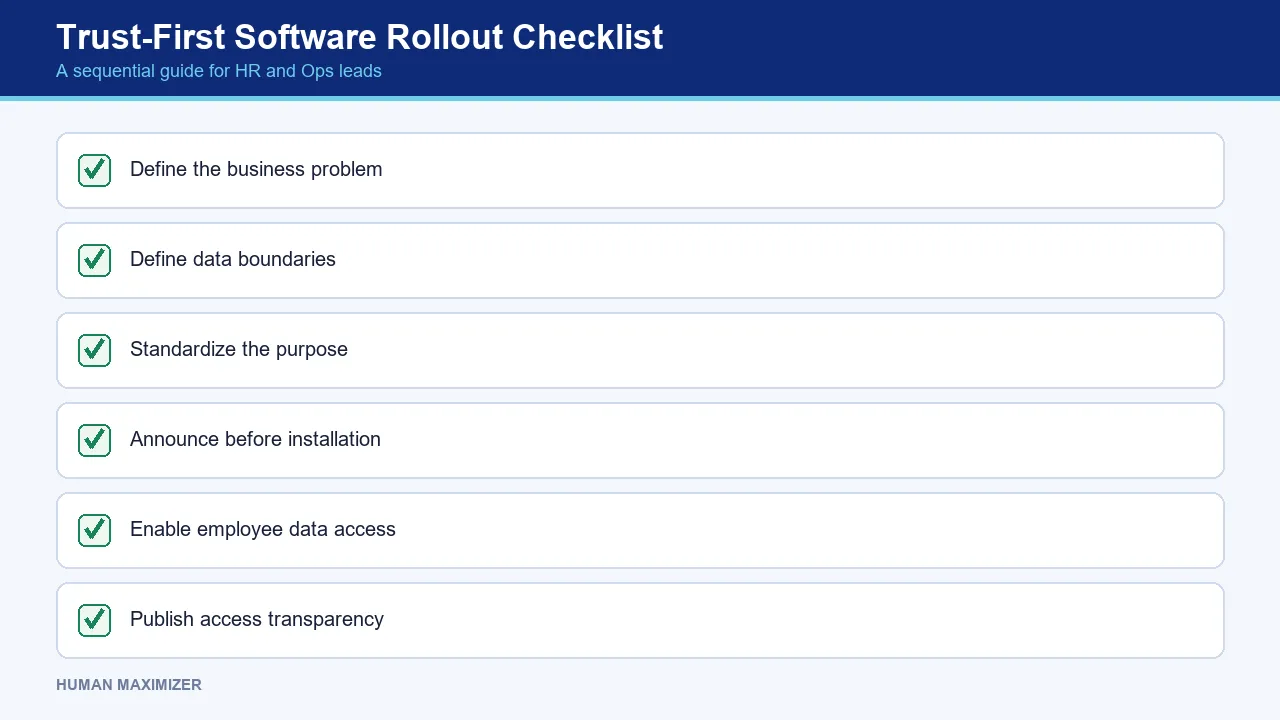
This is where most implementations live or die. Below is the rollout sequence we would hand any HR or ops lead deploying tracking for the first time. It is deliberately ordered: skip a step and the backlash compounds.
Before you install anything
- Write the one sentence. State the specific problem the tool solves and what success looks like at 30, 60, and 90 days. If you cannot finish "we are doing this so that ___," you are not ready to buy.
- Name what you will never collect. Decide up front that there are no covert screenshots, no keystroke text, no reading of anyone's dashboard outside a manager's own reporting line. Write it down before anyone asks.
- Pick a purpose, not a person. The stated goal is unblocking work, not catching individuals. Say so in the same words to the whole team.
During the announcement
- Tell people before the agent lands, not after. A tool that appears on machines overnight reads as a trap no matter how clean the data policy is.
- Show employees their own view first. Let each person see their own daily stats and break summary before any manager sees a rollup. Ownership of one's own data is the single biggest predictor of whether tracking is welcomed or resented.
- Publish who can see what. Make the access model plain: employee sees self, manager sees direct reports, and any wider read is logged.
In the first 90 days
- Run a pilot, then a real cutoff. Trial with one team, gather structured feedback, then set a firm date to retire the old process. Parallel-running forever guarantees nobody adopts either.
- Review honestly at 30 and 90 days. If the tool is not lowering the visibility tax, say so and change course. Willingness to admit a tool is not delivering is what keeps trust intact.
Copy that list into your project doc and work it top to bottom. It is the part competitors skip, and it is the part that decides whether your rollout adds clarity or fear.
Where Data Should Defer to Judgment
Being candid about the limits is part of doing this well, so here is the honest version.
Productivity analytics is genuinely bad at measuring deep, non-linear work. The senior engineer who spends a morning staring at a whiteboard and then deletes four hundred lines of code will look idle on every tile you have, and firing a performance conversation off that reading is how you lose your best people. Metadata cannot see thinking.
It is also the wrong instrument for a morale problem you already suspect. If a team is disengaged, more monitoring accelerates the exit; it does not diagnose the cause. Managers tend to over-trust dashboard motion in the early weeks, then lose confidence when deadlines slip anyway, precisely because activity was never the thing that moved the work. And for anything approaching a disciplinary or legal decision, aggregated signals are context, not evidence. The conversation with the human still has to happen.
The rule we hold to: the data opens a question, it never closes one.
Remote Success: Using Insights to Support, Not Surveil
For distributed teams, tracking done right removes a real anxiety rather than adding one. A remote employee with no visibility into how their work reads to management often over-performs presence to compensate, which is the visibility tax at its most expensive. Give that person a clear, self-owned view of their own output and a manager who reads stoppage signals as "does someone need unblocking?" rather than "who is slacking?", and the tax drops toward zero.
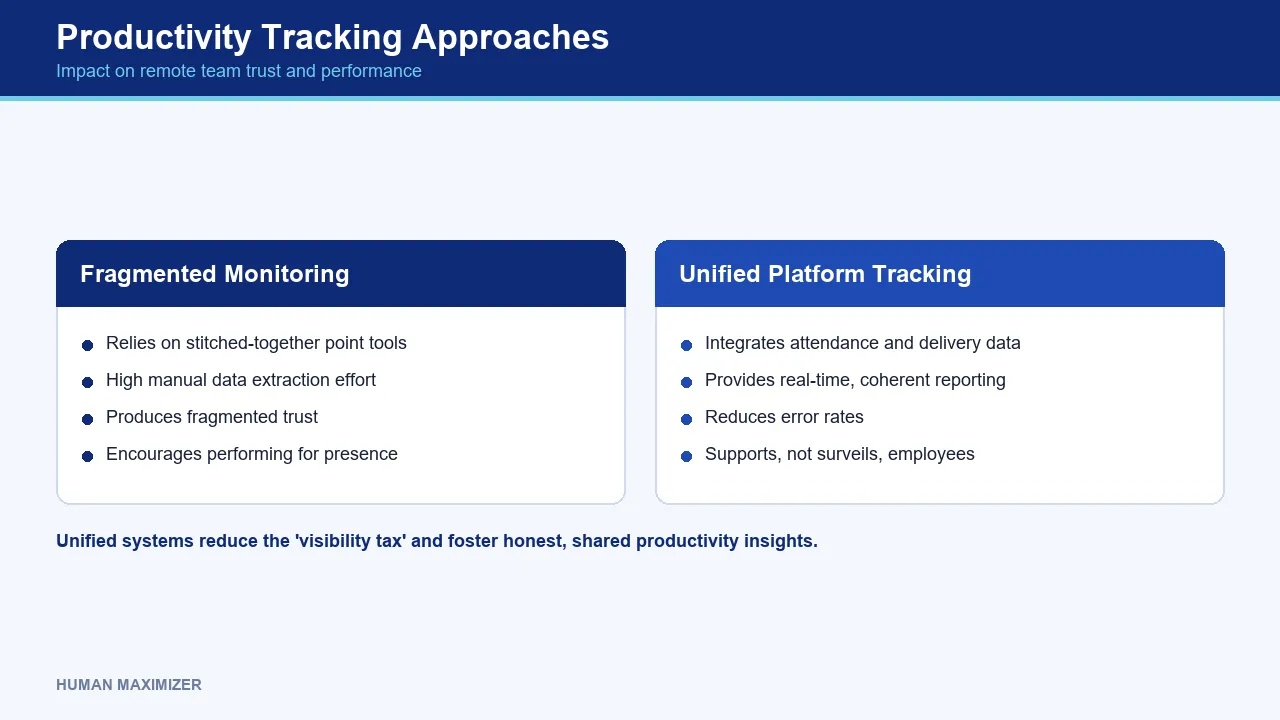
The accountability benefit is real and worth stating plainly. Aggregated productivity analytics gives a distributed team a shared, honest picture of where work sits, which is worth far more than a green presence dot. It is telling that most HR leaders cannot pull real-time reporting from their current systems without manual extraction and that unified platforms cut error rates well below stitched-together point tools. Fragmented monitoring bolted onto fragmented HR data produces fragmented trust. When tracking lives inside one system alongside attendance and delivery data, the picture is coherent enough that people stop performing for it. For teams wanting the measurement side in more depth, our guide to measuring and tracking employee productivity breaks down the metrics that hold up.
Frequently Asked Questions
What is the difference between time tracking and productivity tracking? Time tracking records hours against a project or shift; it is a clock. Productivity tracking maps where work moves and where it stalls across stages. Hours are an input, whether the work shipped is the output, and the two often disagree.
How does productivity tracking software affect employee morale? It depends entirely on who the data serves. When employees see their own numbers first and tracking is framed as unblocking work, it tends to be welcomed. When it is covert or used as proof of effort, it undermines morale and pushes people to perform busyness instead of results.
Is employee monitoring legal in India? Employers can monitor work activity, but the DPDP Act, 2023 treats that activity as personal data, which requires a clear purpose and reasonable notice. Collect the minimum needed for a stated reason, disclose what you collect, and avoid covert capture. For anything sensitive, take formal legal advice on your specific setup.
Can productivity tracking tools integrate with project management software? Yes, and they should. Connecting activity signals to tools like Asana, Trello, Jira, or ClickUp is what lets you collect less at the individual level, because outcome data from the work tools carries most of the weight of knowing a team is on track.
The Tax You Choose to Stop Paying
Go back to the developer staying at the desk until 8 PM to look committed. That extra hour produced nothing except a signal, and the signal was for a dashboard that was never asked to reward presence in the first place. That is the visibility tax, and it is entirely self-inflicted by how a rollout is framed. Deploy productivity tracking software as clarity that the tracked person owns, and the developer logs off at a reasonable hour, confident the work speaks for itself. Deploy it as suspicion, and you will pay that tax every evening while your best people quietly plan their exit. If you want to see how a tracking layer built on that boundary works in practice, book a quick call with our team.
About the Author & Reviewer
Nishant Tandon — Co-founder & Lead Partner, Razor Infotech
Nishant Tandon is Co-founder and Lead Partner at Razor Infotech, with over a decade in IT, customer support and business operations, helping SMEs achieve cost efficiency, stronger customer experience and scalable, sustainable growth.
Connect on LinkedIn
Reviewed & approved by Sameer Hameed — Founder & Chairman, Razor Infotech
Sameer Hameed is the Founder & Chairman of Razor Infotech, where he is guiding the creation of Human Maximizer. An entrepreneur across technology, real estate, mining and travel, he builds organisations on clarity, trust and responsible growth — on the belief that businesses grow only when the people behind them grow.
Connect on LinkedIn
Human Maximizer is built by Razor Infotech in New Delhi, India (founded 2019). About Human Maximizer.
Keep reading
HR Strategy
A Complete Guide to Measuring Productivity at Work
Are you struggling to measure productivity at work? Discover proven metrics, KPIs, frameworks, and tools HR leaders use to track employee and team performance.
5 min read
HR Strategy
Employee productivity software
How to evaluate employee productivity software for your Indian business. Learn to balance performance tracking with team trust and data privacy needs.
13 min read
Employee Engagement
The Day-One Contribution Framework: Why the 30-60-90 Day Onboarding Plan is Killing Engineering Velocity
Replace slow 30-60-90 day plans. See how a developer onboarding framework boosts engineering velocity and gets Indian tech teams coding on day one.
13 min read