
HR Strategy
Coaching, Not Surveillance: How to Choose Employee Productivity Software for an Indian Team
How to evaluate employee productivity software for your Indian business. Learn to balance performance tracking with team trust and data privacy needs.

Nishant Tandon
Co-founder & Lead Partner, Razor Infotech · 13 min read · · Updated
It's 4:30 PM on a Tuesday in a Bangalore tech hub, and your strongest backend developer glows green on the dashboard. Eight hours "active." No idle flags. Yet their sprint velocity has dropped for the third week straight, and nobody upstairs can explain why. Read only the activity logs and you will congratulate the wrong signal while a burnout quietly compounds under it. That gap, between motion and progress, is the whole reason employee productivity software is so easy to buy badly. Over the years teams consistently find HR teams sign for the dashboard that shows the most and understand the least.
This guide is for the HR manager or founder who has to actually choose one of these tools and defend the choice to a nervous team. Not a ranked list. A way of evaluating that starts from a different question: does this software help you coach people, or just watch them?
The Productivity Paradox: Activity Tracking vs. Surveillance
The two words get used interchangeably in sales calls, and they should not be. Employee activity tracking records what happened: apps opened, sites visited, minutes typed, meetings attended. Surveillance is what activity tracking becomes when the goal quietly shifts from understanding the work to catching the worker. Same data feed. Completely different intent, and employees can smell the difference from the first login.
Here is the trap. A tool that counts keystrokes and screen time answers "was this person at their machine?" It cannot answer "was this person solving the right problem?" Some of the best engineering work happens on a whiteboard or a walk, away from the keyboard entirely. Reward the visible and you teach your team to postpone the hard, quiet thinking in favour of small, loggable busywork. A recurring pattern is exactly that pattern: the dashboard rewards what it can see, so deep work gets pushed to the evening and the calendar fills with performative activity.
Done honestly, productivity tracking does have real upside. It can improve visibility, surface where a workflow snags, and help managers spot who needs training rather than a warning, as one buyer's guide on tracking tools lays out. The difference is whether the tool points a manager toward a conversation or toward a punishment.
Where Indian Law Draws the Line on Employee Monitoring
This is the section most global vendor blogs skip entirely, and it is the one an Indian HR manager cannot afford to skip. Monitoring software sits at the intersection of two legal realities that keep shifting.
First, the Digital Personal Data Protection Act, 2023 reframes any personal data your tool collects, including behavioural and activity data, as something you process on a lawful basis, with notice and a defined purpose. Keystroke counts, browsing logs, and screen captures of an identifiable employee are personal data. Once the Act's rules are fully in force, "we track everything by default" stops being a neutral setting and becomes a liability you have to justify.
Second, the Information Technology Act, 2000 already governs how you handle sensitive electronic information, and reasonable security practices are not optional for the data you hoard.
The practical takeaway is simpler than the statutes: collect the minimum you need, tell people clearly what is collected and why, and never let the tool capture more than the purpose demands. A platform that silently screen-records by default is a compliance problem waiting for an audit. A platform that captures keystroke counts but never keystroke text, and triggers a screenshot only on an explicit, logged manager request, is defensible. For a fuller treatment of this from the practitioner side, our team wrote a longer piece on how Indian HR leaders can evaluate productivity without overreaching.
If any of this sounds like a fight you are about to walk into, we should talk.
The Coaching-First Evaluation: A Buyer's Checklist
Most buyer's guides hand you a feature grid. A feature grid tells you what a tool can do, not whether it will help your team get better at their work. So we use a different lens when we assess these tools, one we call the Coaching-First Evaluation. It asks, for every capability, a single test: does this help a manager have a better conversation, or does it just generate evidence?
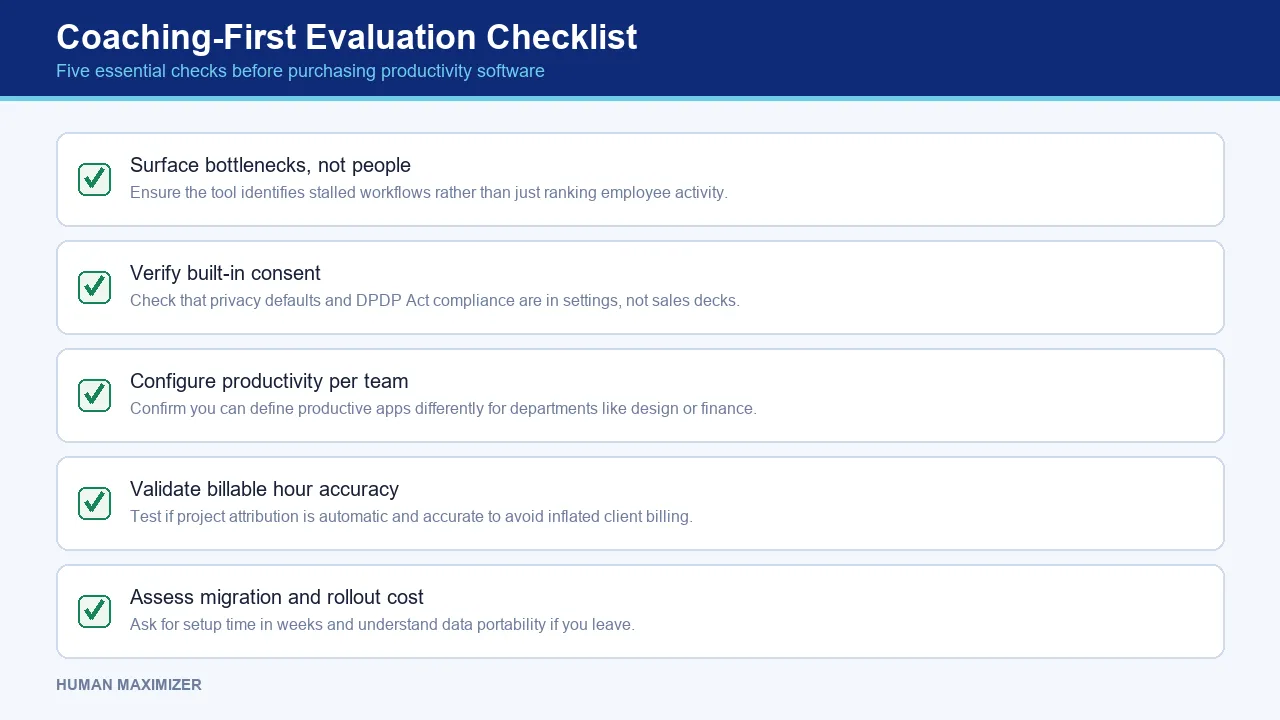
Run any shortlisted product through these five checks before you sign anything.
Does it show the bottleneck, or just the person?
The most useful signal is almost never one worker's score. It is the task sitting stuck for four days between two people who each think the other owns it. Ask the vendor to show you, live, how the tool surfaces a stalled workflow, not just a leaderboard. If the answer is only a ranking of who typed most, you are buying surveillance with a productivity label.
Is consent built in, or bolted on?
Check the defaults. Can an employee see their own dashboard? Are screenshots and recordings off unless a manager explicitly requests them, with that request logged? Is there a department-level setting so Slack counts as productive for support and unproductive for the assembly floor? Consent that lives in the settings, not the sales deck, is what keeps you on the right side of the DPDP Act.
Can you configure "productive" per team?
A blanket definition of productive activity across a whole company is meaningless. Designers live in Figma; finance lives in spreadsheets; support lives in chat. If you cannot mark apps and sites as productive or unproductive per department, every "% productive" number the tool produces is noise.
Does it help with billable hours and project attribution honestly?
For services firms, tying time to projects and billable hours is genuinely valuable, and something the SMB buyer's guides on productivity tools rightly emphasise. Test whether attribution is automatic and accurate, or whether it silently inflates numbers your client will later dispute.
What is the real migration and rollout cost?
Ask, in weeks not adjectives, how long setup and adoption actually take, and what your data looks like if you leave. A tool nobody trusts gets uninstalled, and the agent going dark is often the first sign the rollout failed rather than the employee.
Which Metrics Actually Predict Output
Managers new to these tools reach for the loudest number: total active minutes. It is the weakest predictor of output there is. Active minutes measure presence, and presence has never shipped a feature.
The metrics worth watching are downstream and outcome-shaped. Task completion rate against committed work. Milestone progression across a sprint or a month. Cycle time on the handoffs between people, which is where most delay actually hides. Rework rate, because a fast task redone twice is slower than a careful one done once. These tell you whether work is moving, not whether a mouse is.
Workforce analytics only earns its keep when it connects to a deliverable. AI-driven insights that flag "low activity" without asking whether the person was in deep focus or a client workshop will train your managers to chase ghosts. The honest version of this data does one thing well: it points a manager at a specific stuck task and says, look here. Our own longer guide to measuring and tracking productivity walks through this metric hierarchy in more detail.
From Dashboard to Development: Catching Burnout Before the Exit
Here is the coaching turn that most surveillance-first tools structurally cannot make. Go back to the Bangalore developer showing green for eight hours while velocity falls. Activity-first software calls that a healthy employee. A coaching-first read calls it a warning.
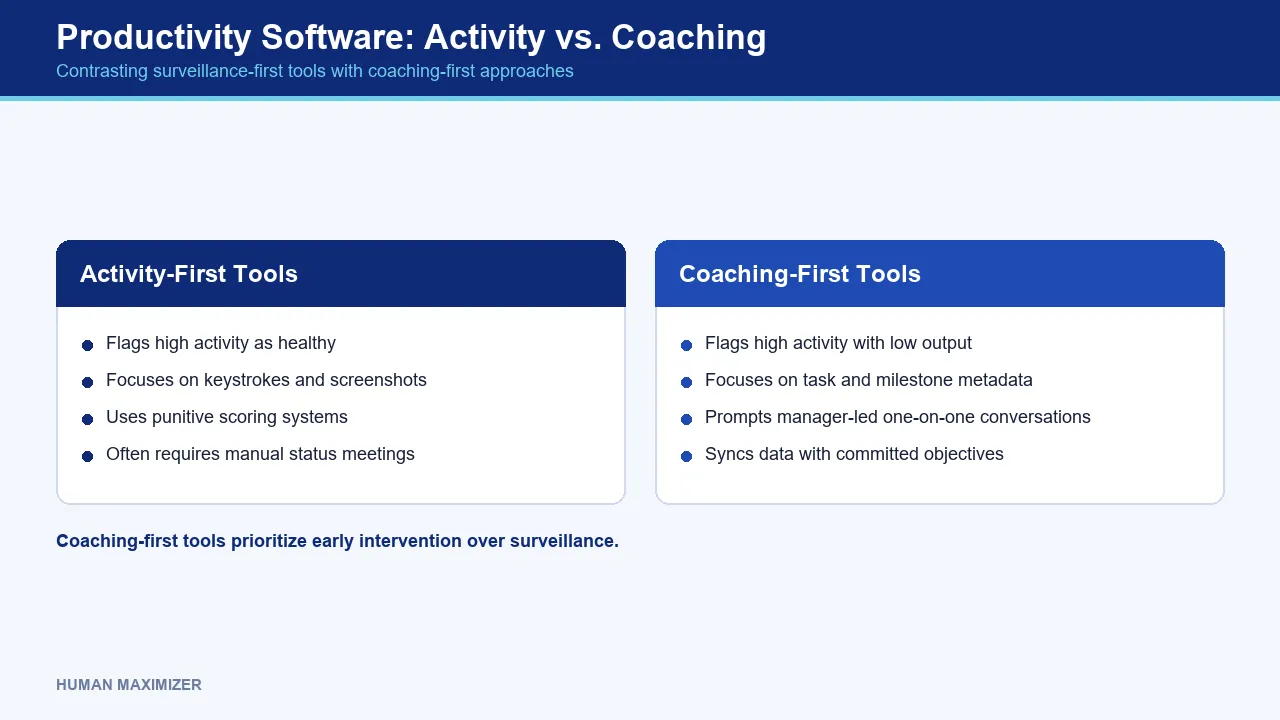
Sustained high activity paired with falling throughput is one of the clearer early burnout signatures you can spot in the data: someone grinding harder for less return, staying "on" late, thrashing between tabs without closing anything. Software can surface that shape. It cannot diagnose it. The tool's job is to prompt the one-on-one; the manager's job is to have it.
This is where a platform like Human Maximizer earns its place. Its Productivity Lens reads task completion and milestone progress from work metadata, and never captures keystroke text, only counts and a rolling top-words view that cannot reconstruct a sentence. So when a task sits stuck between a developer and a reviewer for days, the manager sees the stall on the timeline rather than a punitive score, and opens a conversation instead of a case file. Screenshots and recordings simply do not fire on their own; they need an explicit, logged request. The point is not to watch harder. It is to notice earlier. You can see how Productivity Lens frames this on its own page.
To keep goals visible without a status meeting every morning, that data pairs with Synergy, which keeps a manager's and a report's objectives in sync so a dropping metric is read against what the person actually committed to.
Keeping Workforce Data Secure
Every tool on your shortlist is a new store of sensitive employee data, and under the IT Act's reasonable-security expectations, that store is your responsibility even when a vendor holds it. Ask hard questions. Where is the data hosted? Is it encrypted at rest and in transit? Who inside the vendor can read it? Screenshots and recordings, if the tool takes them at all, should sit in a private, access-controlled bucket, not a shared drive.
Least privilege matters as much as encryption. A random signed-in employee should not be able to enumerate a colleague's browsing history or system info; cross-employee visibility should be gated behind an explicit HR or admin permission. When that gate does not exist, the tool has quietly turned every curious employee into a monitor, and that is a breach story waiting to be written.
Rolling It Out Without Torching Morale
You can buy the most privacy-respecting tool on the market and still wreck team morale by introducing it badly. Employee pushback climbs the moment tracking feels like suspicion rather than clarity, and once trust drops, no configuration wins it back.
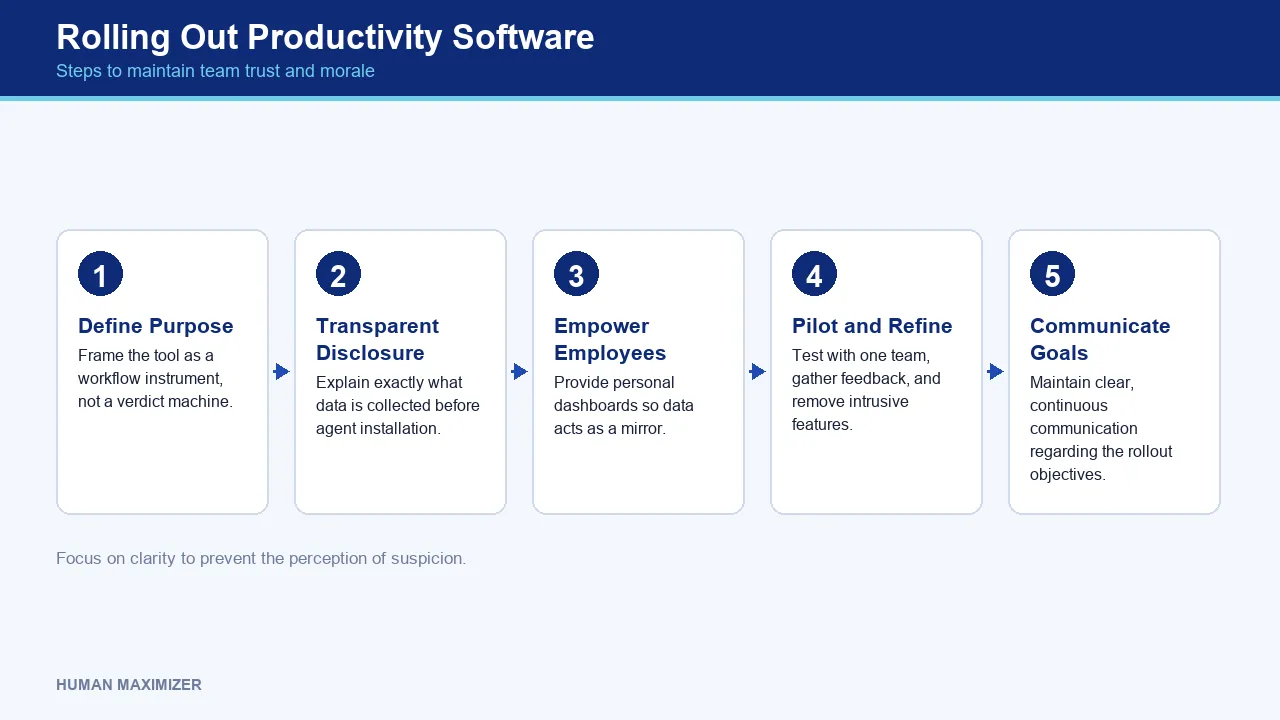
Introduce the tool as a workflow instrument, not a verdict machine. Tell people exactly what is collected and what is not, in plain language, before the agent installs. Give employees their own dashboard from day one so the data is a mirror, not a one-way glass. Pilot with one team, gather honest feedback, and be visible about turning off anything intrusive that adds no value. The worktime industry analysts make a related point about vendor relationships: clear, continuous communication of goals is what keeps a rollout from drifting off purpose. The same is true internally with your own team.
Where Even the Best Tools Fall Short
Honesty check, because no software earns trust by pretending to be complete.
Activity data is a terrible judge of creative and strategic work. A strategist's most valuable hour may show as near-zero activity while they think. Do not let the dashboard grade that person; use human judgment.
The data also cannot see the cause behind a stall. A dropped throughput number might mean burnout, a blocking dependency, a sick child at home, or a badly scoped task. The tool flags the what; only a conversation finds the why. Treating a red metric as a conclusion rather than a question is the single most common mistake we see managers make with these systems.
And for field or blue-collar roles, desktop activity tracking is simply the wrong instrument. Attendance, roster, and geo-fenced check-ins carry that story, not app-usage logs.
Frequently Asked Questions
What is the difference between productivity tracking and employee surveillance? Tracking records work activity to understand and improve how work flows. Surveillance uses the same data to police individuals. The technical feed can be identical; the difference is intent, defaults, and whether employees can see their own data. If the goal is a better one-on-one, it is coaching. If the goal is a paper trail, it is surveillance.
Is employee monitoring legal in India? Monitoring on company systems is generally permitted, but activity data is personal data under the DPDP Act, 2023 and must be handled with notice, a defined purpose, and reasonable security under the IT Act, 2000. The safe approach is transparency and data minimisation. For anything sensitive or contested, confirm your specific setup with a qualified legal advisor.
Can productivity software help identify burnout? It can surface an early signature, sustained high activity with falling output, late-night thrashing, rising rework, but it cannot diagnose burnout on its own. Treat the signal as a prompt to check in, never as a conclusion.
How do I choose the right tool for a remote team? Prioritise outcome metrics over activity minutes, per-team configuration of what counts as productive, employee-visible dashboards, and privacy-safe defaults. Then test the real rollout timeline before committing.
The 4:30 PM Test
Come back to that green dashboard in Bangalore. The developer who looked productive for eight straight hours was not slacking; they were drowning, and the activity log was congratulating them for it. The right employee productivity software would have shown the reviewer a task stuck for three days and a throughput line bending the wrong way, and turned a silent burnout into a Tuesday conversation before it became a Friday resignation. That is the only test that matters when you evaluate one of these tools: not how much it lets you watch, but how much earlier it lets you help. Choose the one that starts a conversation, and see how Human Maximizer does it.
About the Author & Reviewer
Nishant Tandon — Co-founder & Lead Partner, Razor Infotech
Nishant Tandon is Co-founder and Lead Partner at Razor Infotech, with over a decade in IT, customer support and business operations, helping SMEs achieve cost efficiency, stronger customer experience and scalable, sustainable growth.
Connect on LinkedIn
Reviewed & approved by Sameer Hameed — Founder & Chairman, Razor Infotech
Sameer Hameed is the Founder & Chairman of Razor Infotech, where he is guiding the creation of Human Maximizer. An entrepreneur across technology, real estate, mining and travel, he builds organisations on clarity, trust and responsible growth — on the belief that businesses grow only when the people behind them grow.
Connect on LinkedIn
Human Maximizer is built by Razor Infotech in New Delhi, India (founded 2019). About Human Maximizer.
Keep reading
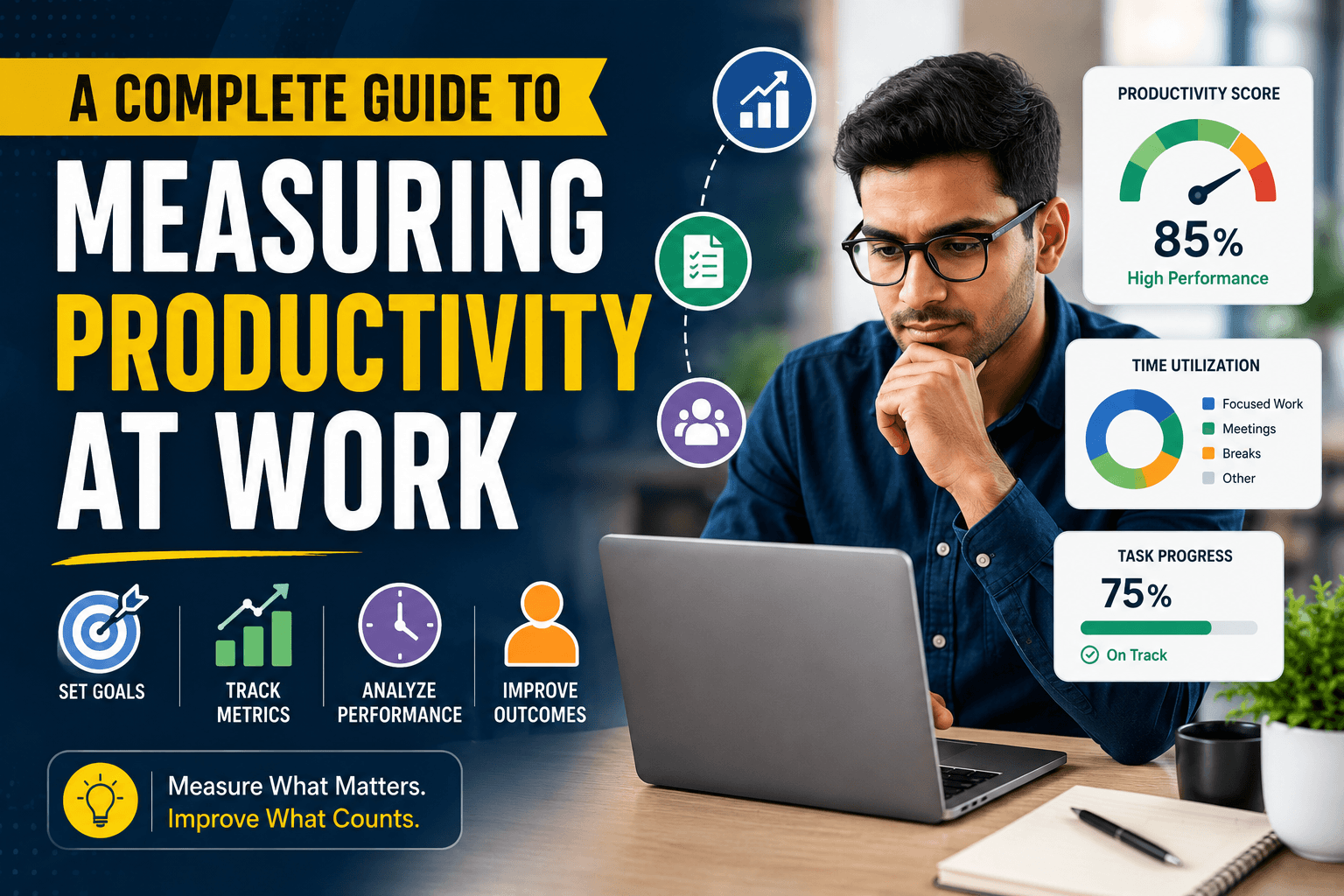
HR Strategy
A Complete Guide to Measuring Productivity at Work
Are you struggling to measure productivity at work? Discover proven metrics, KPIs, frameworks, and tools HR leaders use to track employee and team performance.
5 min read
HR Strategy
Workforce Productivity Software
Why your current workforce productivity software might be masking critical performance gaps and learn how to gain true visibility into team output...
13 min read
HR Strategy
Beyond the Black Box: ethical AI in HR
How CPOs can implement predictive analytics while maintaining transparency. Learn to mitigate bias and build lasting employee trust with AI in HR...
8 min read