
HR Strategy
Three Channels, One Record: Writing a Leave Application for Office
Professional templates for a leave application for office and learn how HR teams can streamline the approval process to maintain team productivity.

Insha Hamid
Head of HR in Research & Content, Human Maximizer · 14 min read ·
Most leave requests in Indian offices get made three times. There is the WhatsApp message to the manager the night before, the email sent because someone once said leave must be "in writing", and the entry in the HR portal, which usually comes last and sometimes never comes at all. Templates for a leave application for office use are easy to find. What they skip is which of those three versions payroll actually reads. We built Leave Management at Human Maximizer around a blunt answer: the system entry is the application, and the other two are courtesy.
This guide gives you formats you can copy. It also covers the two things most template pages leave out: what to check before you write a word, and what both sides should do when the answer is no.
The Record-First Rule: Why Only One Version Counts
Here is the rule we would put above every template: a leave request does not exist until it sits in the system that feeds attendance and payroll. Tell your manager however your team prefers. Then record it, the same day.

This is how large employers already write their policies. Adobe's published India leave policy tells employees to mark leave in the system as soon as they take it, and states that leave older than 3 months, or from a previous calendar year, can no longer be applied. It treats a missed entry as a policy violation.
The money side is just as plain. AstraZeneca's India leave and holiday policy requires prior HR consent for leave without pay and says an employee on loss of pay is not entitled to salary or other employee benefits from the day of absence until the day they resume. An absence nobody recorded is one conversation away from becoming exactly that.
What the missing record costs
The clean-up around an unrecorded leave usually takes longer than the application would have. An invented example, labelled as such, makes the arithmetic visible:
- A 150-person jewellery exporter in Jaipur has one in ten employees take a day each month that was agreed on chat and never entered. That is 15 absences with no record.
- The biometric attendance export shows each of those days as absent. Payroll software imports that file as it stands, so it calculates loss of pay for leave the manager had agreed to, unless someone edits the import by hand.
- Each one takes ten minutes to trace the message, confirm with the manager and correct the attendance entry before the file is imported again.
- The total is 150 minutes, or two and a half hours, landing in the two days before payroll closes.
Halve the rate or double it for your own company. The work still falls on the same person in the same week, and the cause is the same: the approval lived in a chat thread that the payroll import never sees.
Before You Write: Check Your Leave Balance and Notice Period
A polite letter asking for days you do not have is a wasted letter. Before drafting anything, check three things.
- Your leave balance by leave type. Casual leave and sick leave are separate buckets, and a total figure tells you little. In Human Maximizer this is the Leave Bank, a monthly statement of days earned, used, pending and remaining. Pending days are already reserved against an earlier request, so do not count them twice.
- The advance notice your leave policy sets for that leave type. Planned casual leave often needs a few days of notice, and sick leave of more than a day or two may need a medical certificate attached.
- The team calendar. If two colleagues are already out on your dates, a rejection is likely, and you can see it coming before you ask.
Leave entitlements in India are not uniform. Earned leave for factory workers comes from the Factories Act, 1948, a central statute whose text can be looked up on India Code, the government's repository of Acts. Offices are generally governed by their state's Shops and Establishments Act plus company policy, which is why two branches of the same company can have different minimums. Your own policy document is the place to check quotas, and our guide to creating a leave policy for a startup in India shows what a clear one should contain.
Pro-tip: verify your state's entitlement at the source. Company policy can give more leave than the law requires, never less. The Ministry of Labour & Employment publishes the central labour laws and codes. For office staff, the minimum comes from your state's Shops and Establishments Act, so check your state labour department's rules for the state where you actually work, and compare them against your policy document.
Leave Application Format: What Every Request Must Carry
Whether it goes by email or through a portal form, a complete request answers the same questions. Miss one and you get a clarifying message instead of an approval.
| Element | What to write | Common slip |
|---|---|---|
| Subject line | Leave type, leave dates, your name | "Leave" and nothing else |
| Identity | Name, Employee ID, team | Assuming HR knows which Rahul |
| Leave type | Casual, sick, earned, comp-off | Leaving HR to guess the bucket |
| Dates and duration | From, to, number of working days, half day if any | Unclear whether the weekend is included |
| Reason for leave | One honest line | A paragraph of justification |
| Handover | Who covers what, and what is paused | "Will manage on return" |
| Contact | A number for genuine emergencies | Promising to be "available on call" all day |
How much reason is enough
One line. "Personal work", "a family function" and "a medical appointment" are all complete reasons for casual leave. Nobody needs your diagnosis or your cousin's wedding itinerary, and oversharing sets a precedent that makes the next person's short reason look evasive. The exception is leave that requires proof under policy, such as extended sick leave. There you supply the document, and still not the story.
Writing the handover
The handover is the part managers actually read. Name the person, the task and the status: "Invoice reconciliation for the March batch is with Priyanka, the file is in the shared folder, and vendor calls are paused until the 14th." A handover that names no one is a wish. Agree it with the colleague before you send the request, and never announce it to them by copying them on the email.
Copy-Paste Formats for a Leave Application for Office
Adapt the brackets and keep the rest short.
Planned casual leave application (email format)
Subject: Casual Leave Request: 12 to 13 March (2 days) | [Name], [Employee ID]

Dear [Manager's name],

I would like to request casual leave for 12 and 13 March (2 working days)
for a family function. I have checked my balance and have [X] days of
casual leave available.

Handover: [Colleague] will cover [task]. [Task] is paused until I return
on 14 March.

I can be reached on [phone] for anything urgent. I have also submitted
this request in the HR portal.

Regards,
[Name]
[Designation, Team]
One-day or half day leave
Subject: Half Day Leave: 20 March, second half | [Name], [Employee ID]

Dear [Manager's name],

I request half day leave on 20 March (second half) for a personal
appointment. [Colleague] will attend the 3 pm client call in my place.
The request is in the portal for your approval.

Regards,
[Name]
Sick leave application for office
Subject: Sick Leave: 5 to 6 March | [Name], [Employee ID]

Dear [Manager's name],

I am unwell and have been advised rest, so I am applying for sick leave
for 5 and 6 March. I will attach a medical certificate if the policy
requires one for this duration.

[Colleague] has access to [file/task]. I will confirm my return by the
evening of 6 March.

Regards,
[Name]
Emergency leave (chat message, followed by a record)
Hi [Manager], I have a family medical emergency and cannot come in today,
[date]. [Colleague] can pick up [urgent task]. I will file the leave
request in the portal by this afternoon and update you on tomorrow.
Many Indian companies allow same-day casual leave for genuine emergencies, provided the manager hears before the shift starts and the written application follows. The follow-up is the half people forget.
Email, Chat, or HRMS Leave Request: Which Channel Does What
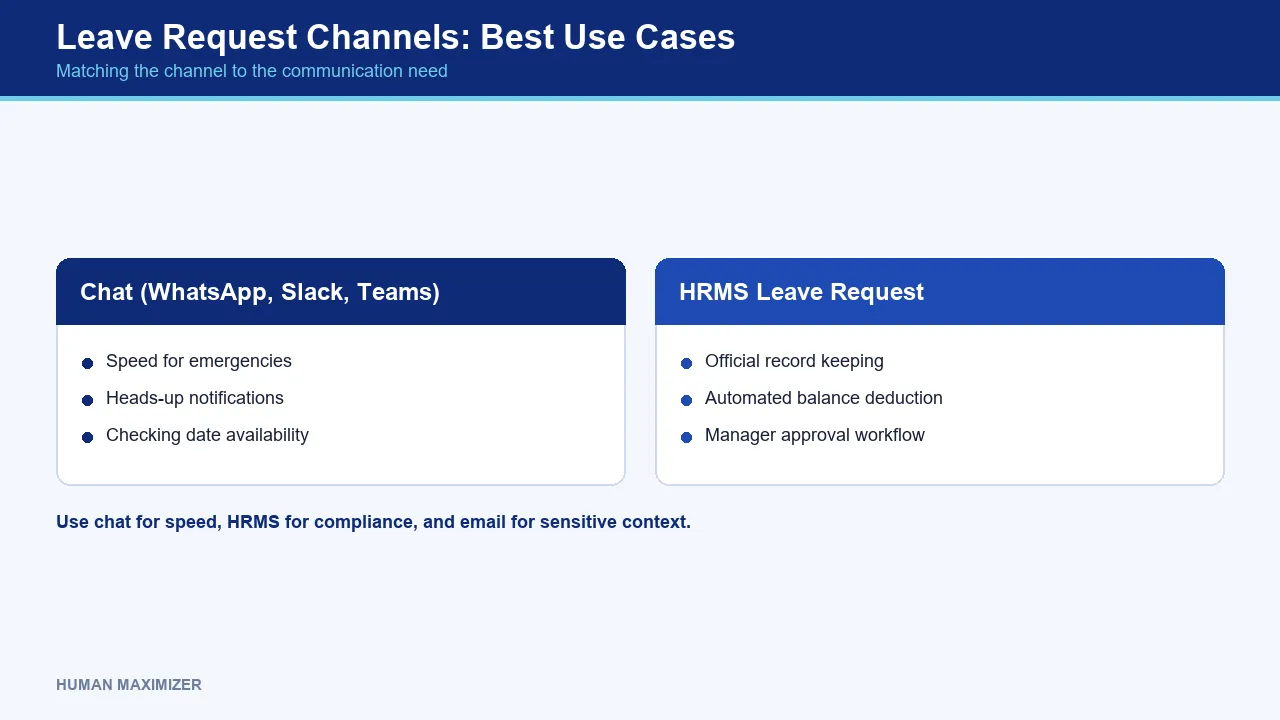
Each channel has one job. Trouble starts when a channel is asked to do another's.
| Channel | Good for | Not good for |
|---|---|---|
| Chat (WhatsApp, Slack, Teams) | Speed: emergencies, a heads-up, checking whether dates are workable | Proof. Messages get buried, and managers change |
| Email or formal letter | Context: long leave, sensitive situations, anything needing a paper trail to HR | Balance tracking. An email deducts nothing |
| HRMS leave request | The record: balance deduction, manager approval, attendance and payroll | Nuance. A form field is a poor place for a delicate conversation |
So the sequence for most requests is a heads-up on chat, a record in the system, and an email only when the situation needs explaining. If your company still runs leave on spreadsheets and inboxes, our comparison of HRMS and manual leave tracking sets out what that costs managers each month.
How HR and Managers Should Respond
Employees get dozens of templates. Approvers get none, which is why replies range from a thumbs-up emoji to three weeks of silence. A request deserves one of three answers, made in the system, within a known time.
Approve, approve partly, or reject with a reason
- Approval: "Approved for 12 and 13 March. Thanks for arranging cover with [Colleague]."
- Partial approval: "I can approve 12 March but not 13 March, as the audit closes that day. Could you take the 16th instead?"
- Rejection: "I cannot approve these dates because two team members are already on leave. Any day from the 18th works. Please resubmit and I will approve the same day."
A rejection without a reason and an alternative reads as a refusal of the person. One with both is a scheduling decision. For shift-based teams, checking the request against Roster Management before replying turns "I think we are short that day" into something you can show.
If you are the employee and the answer is no
Do not take the day anyway, because that converts refused leave into unauthorised absence and probably loss of pay. Ask what would change the answer: different dates, a stronger handover, a half day in place of a full one. Resubmit in the system so the revised request has its own record. If refusals from one manager become a pattern, raise it with HR through a formal query and not a corridor complaint. Ticket Management gives that query a queue where pending, assigned and resolved items are visible.
When a request is still pending at month-end
Take a request filed on the 27th for the 30th and 31st, with the manager travelling.
- In a manual setup: nobody notices until the salary is short.
- In our system: payroll will not run while leave requests in that pay period are pending, so the manager has to approve or reject first, which they can do from the mobile app.
- If approved: the leave syncs to Attendance Management, so the days are not marked absent.
- If rejected and the employee was absent anyway: the unpaid days align with LOP in Payroll. The outcome is unpleasant, but it is visible before payday.
In a July 2026 review of 24 client accounts, monthly payroll corrections fell from 15 to 3 after go-live. We did not isolate how much of that came from leave, so read it as a result of attendance, leave and payroll sharing one record, and not as a leave statistic.
Standardizing the Workflow Across Managers
When we were building the product, we spoke with HR leaders, managing directors and founders across Indian companies. A leave process that looked tidy in the policy document would break at one desk: the manager who approved everything verbally and never opened the system. That team's records were fiction, and nobody knew until that manager resigned and took the informal arrangements with them.
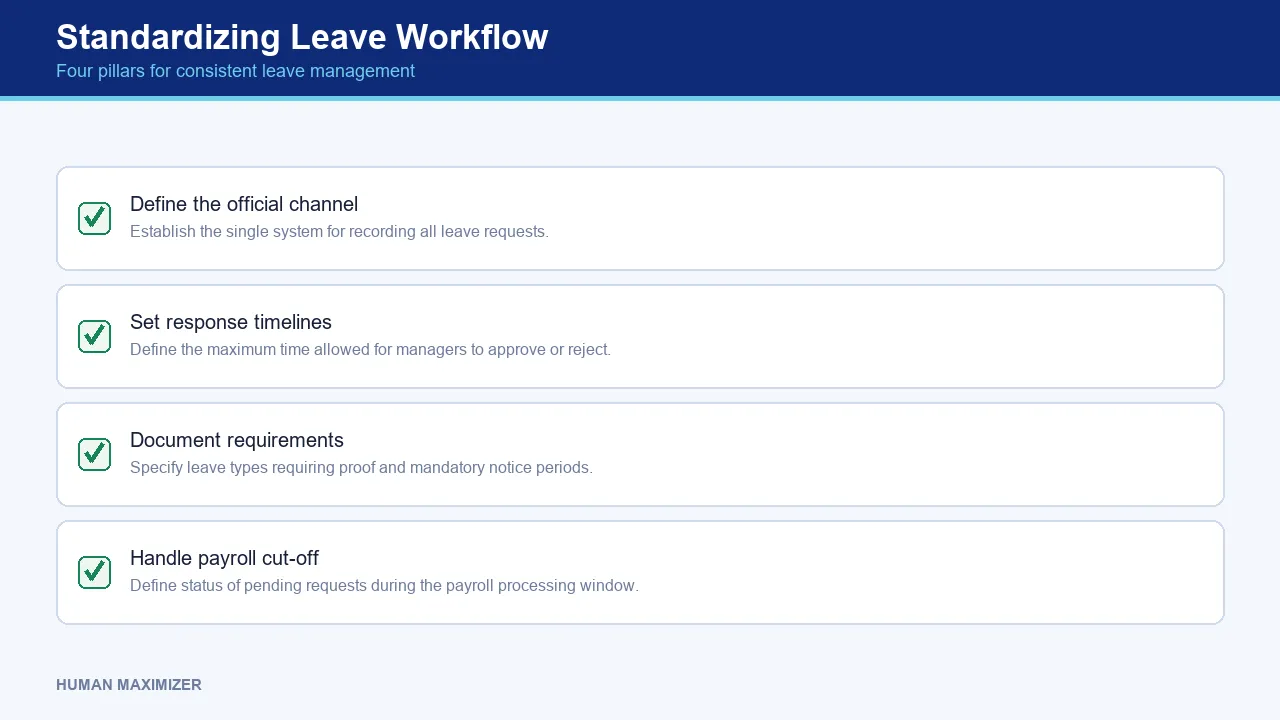
Standardizing means deciding four things and writing them down:
- which channel is the record
- how quickly an approver must respond
- which leave types need documents and how much notice
- what happens to requests still pending at payroll cut-off
HR configures the leave types and quotas. Managers own the response time. Everything else follows from those two.
Where a Standard Format Stops Helping
A template and a workflow handle routine leave. They handle these cases poorly.
- Long or sensitive absences. Maternity leave, extended illness and bereavement carry statutory or human considerations that a form field flattens. Start these with a conversation with HR and record them afterwards.
- Retroactive fixes. In our own system an approved leave can be cancelled by the employee only before it starts, at least one day ahead. Anything after that needs HR, by design. This is slower, and it is also why the record can be trusted.
- Judgment calls. No software can tell you whether refusing leave during audit week was fair. It can show who else was out and how often this person has been refused, and the decision stays with a human.
Frequently Asked Questions
How do I write a professional leave application for office? State the leave type, exact dates and number of working days in the subject line and first sentence. Add a one-line reason, a named handover and a contact number, then submit the same request in your HR system so it reaches attendance and payroll.
What is the standard format for a one-day leave application? Three or four lines are enough: the date, the leave type, a brief reason and who covers anything urgent. A one-day casual leave application does not need a formal letter, but it does need a system entry.
Is it necessary to give detailed reasons for personal leave? No. A short, truthful reason such as "personal work" or "a medical appointment" is sufficient for casual leave in most policies. Detail or documents are needed only where the policy asks for proof, typically for longer sick leave.
Can I apply for leave after I have already taken it? Often yes, for emergencies, but within limits your policy sets. Some employers block entries beyond a fixed window or after the calendar year changes, so file on the day you return at the latest.
Conclusion
Go back to those three versions of the same request: the chat message, the email, the portal entry. Keep the first for speed and the second for context, but treat the third as the application, because it is the only one that deducts a balance or protects a salary. As more Indian employers write hard cut-offs for late entries into their policies, the leave that was "approved on WhatsApp" is the one that turns into loss of pay. We would rather that surprise never reached payday.
Want leave requests that reach payroll without anyone retyping them?
About the Author & Reviewer
Insha Hamid — Head of HR in Research & Content, Human Maximizer
Insha Hamid heads HR research and content for Human Maximizer at Razor Infotech, covering people operations and Indian workplace compliance — translating regulatory change and workplace research into guidance HR teams can act on.
Connect on LinkedIn
Reviewed & approved by Sameer Hameed — Founder & Chairman, Razor Infotech
Sameer Hameed is the Founder & Chairman of Razor Infotech, where he is guiding the creation of Human Maximizer. An entrepreneur across technology, real estate, mining and travel, he builds organisations on clarity, trust and responsible growth — on the belief that businesses grow only when the people behind them grow.
Connect on LinkedIn
Human Maximizer is built by Razor Infotech in New Delhi, India (founded 2019). About Human Maximizer.
Keep reading
HR Strategy
Cloud HRMS Software: Beyond Annual Reviews
How modern cloud HRMS software transforms performance management in India by enabling continuous feedback, real-time goal tracking...
14 min read
HR Strategy
Maximizing Revenue per Employee (RPE)
How to shift your focus from headcount to efficiency. Learn how to leverage HRMS software for revenue growth to optimize your mid-market performance.
14 min read
HR Strategy
HR Mobile App India: Beyond Attendance
The essential features that transform an HR mobile app for employees from a simple clock-in tool into a powerful hub for productivity and engagement.
15 min read