
HR Strategy
Beyond Attendance: What an HR Mobile App in India Must Do
The essential features that transform an HR mobile app for employees from a simple clock-in tool into a powerful hub for productivity and engagement.

Insha Hamid
Head of HR in Research & Content, Human Maximizer · 15 min read ·
The HR app your head-office team quietly tolerates is usually the one your field team quietly abandons. That gap is the single biggest reason mobile HR rollouts stall in Indian companies, and it almost never shows up in the vendor demo. A developer sitting at a desk in Powai will forgive a three-tap login and a form that needs a pinch-zoom. A sales executive standing in a Mumbai local, one hand on the rail, one thumb free, will not. He will mark attendance late, or call his reporting manager, or send a WhatsApp message that someone in HR retypes into a sheet on Friday. We see the consequence downstream, in Attendance Management records that need reconciling before every payroll cut-off. So when people ask what an HR mobile app in India should actually do, the honest answer starts with a question about who is holding the phone.
Most feature lists treat "mobile access" as one capability. It is at least two. Desk staff use the app occasionally, for payslips and leave. Field, shift, factory and retail staff use it as their entire interface with the employer: it is their punch clock, their salary slip, their leave request, their grievance channel. When the app is designed for the first group and handed to the second, adoption dies in the second month and HR goes back to spreadsheets, without ever writing down why.
The Employee Experience Case Nobody Makes in the Demo
Engagement is not a soft concern for a company with distributed staff. Only 23% of employees worldwide are engaged at work, costing the global economy $8.9 trillion in lost productivity, and for an employee who never sets foot in the head office, the HR app is the employer relationship. It is where they find out whether their PF was deducted correctly, whether their leave was approved, whether anyone read their query.
Treat that surface as an admin utility and you get an admin outcome: compliance data collected, relationship unbuilt. Treat it as the employee's front door and the same modules start doing different work.
The One-Thumb Test: A Working Standard for Any HR Mobile App in India
Here is a standard we use when assessing whether a mobile HR feature is genuinely usable by the whole workforce, rather than by the half that sits at a desk.
The One-Thumb Test: an employee must be able to complete the task with one thumb, on a mid-range Android phone, standing, on a weak connection, in under thirty seconds, without being told how.
That sounds strict. It is deliberately strict, because every task that fails it converts into an HR query, and HR queries are the real cost. Model it yourself: a 200-person company where each employee raises about 1.5 HR queries a month, at roughly six minutes of HR time to receive, chase and resolve each one, is spending 200 × 1.5 × 6 = 1,800 minutes, or 30 hours a month, on questions a working app would have answered. Halve the query rate if you think mine is too high; you are still losing two full working days a month. Adjust the numbers to your own team and the conclusion holds.
The checklist
| Employee task | Passes the One-Thumb Test when |
|---|---|
| Mark attendance | One tap from the app's first screen. No menu, no date picker, no manual location entry. |
| View this month's payslip | Two taps to open, one to download as PDF. Readable without zooming. |
| Apply for leave | Balance visible on the same screen as the form. Type, dates, submit. Nothing else mandatory. |
| Approve a request (manager) | Actionable from the notification itself, with the requester's balance shown inline. |
| Raise an HR query | A category, a text box, a submit button, and a visible ticket status afterwards. |
| Check PF and tax deductions | Reachable from the payslip, not buried under a separate reports section. |
Print it. Run it against any app on your shortlist, on the cheapest phone in your office, on mobile data rather than office Wi-Fi. Most shortlists shorten fast.
Beyond the Punch-In: GPS, Offline Sync and Mocked Locations
Attendance is where blue-collar and white-collar requirements diverge most sharply, and where the cheapest-looking option usually costs the most.
Offline is the default, not the exception
Field staff work in basements, warehouses, remote sites and 2G pockets. An app that requires a live connection to record a punch has quietly made itself the employee's problem. The correct behaviour is to capture the punch locally with its timestamp and location, then sync when the network returns, with the employee seeing a clear "pending sync" state rather than a silent failure. Ask any vendor to demonstrate this in aeroplane mode. It is a five-second test and it separates the category more effectively than any feature grid.
Location that can be trusted
GPS attendance tracking only means something if the coordinate is real. Mock-location apps are freely available on Android, and an attendance system that accepts whatever the handset reports is collecting fiction. Our Geo-Fencing detects a faked or mocked location rather than recording it as a valid punch, and management can verify attendance against the site an employee was actually assigned to.
There is a second layer that matters just as much and gets discussed far less: device binding. In Human Maximizer, an employee's account is bound to one physical device, and that binding has to be released before the same phone can register a second employee. Without a rule like that, two employees can share one handset, or one can install the app on a colleague's phone and punch in from anywhere. The employee never sees a confirmation screen for this; they just experience the app working normally, and only encounter it if something is wrong.
Illustrative scenario (a composite built to show the mechanics, not an account of any real customer): a field executive marks attendance at 9:12 AM. The coordinates place him at the assigned client site, but the handset reports a mocked location. The punch is flagged rather than silently accepted, his reporting manager sees the exception the same morning, and it is resolved before the payroll cut-off instead of surfacing three weeks later as an unexplained payment dispute. Broken processes almost always show up as rework long before they show up in a report.
Our own numbers say the same thing from the other end. Across 24 client accounts reviewed in July 2026, monthly payroll corrections fell from 15 to 3 once attendance stopped arriving as a reconciliation problem. That is the real measure of whether mobile attendance works: not how many punches it captures, but how few of them someone has to argue about later. A deeper breakdown sits in our guide to why attendance tracking is failing in 2026.
Payslips, PF and TDS Inside an Employee Self-Service Mobile App
Payroll is the feature employees actually open the app for, and everything else in mobile HR benefits from that habit.
Payslip access on mobile is not just a convenience feature in India, because the Indian payslip carries statutory lines the employee has a real interest in checking. Employee provident fund contribution runs at 12% of basic plus dearness allowance, the employer's statutory liability is capped at a wage ceiling of ₹15,000 per month of basic plus DA, and ECR filing and payment fall due by the 15th of the following month, per EPFO's published rules. ESI applies below a gross wage of ₹21,000 a month. Professional tax, where the state levies it at all, is constitutionally capped at ₹2,500 a year. TDS sits alongside all of it. An employee who can see those deductions on their phone, month after month, catches an error early. An employee who has to email HR for a copy catches it at the end of the financial year, if at all.
Investment declarations and proof submission belong on the same surface, for a practical reason: the people most likely to miss the declaration window are the people least likely to be sitting at a laptop in January. What our Payroll module does differently is that attendance and payroll sync automatically, with no manual re-entry between the two. Across 32 client accounts reviewed in July 2026, the first payroll cycle after go-live took about four hours, against two days on the system it replaced.
Leave Requests Without the WhatsApp Trail
Leave is the simplest module to build and the easiest to build badly. The failure mode is always the same: the balance lives in one place, the request in another, and the approval in a manager's chat history.
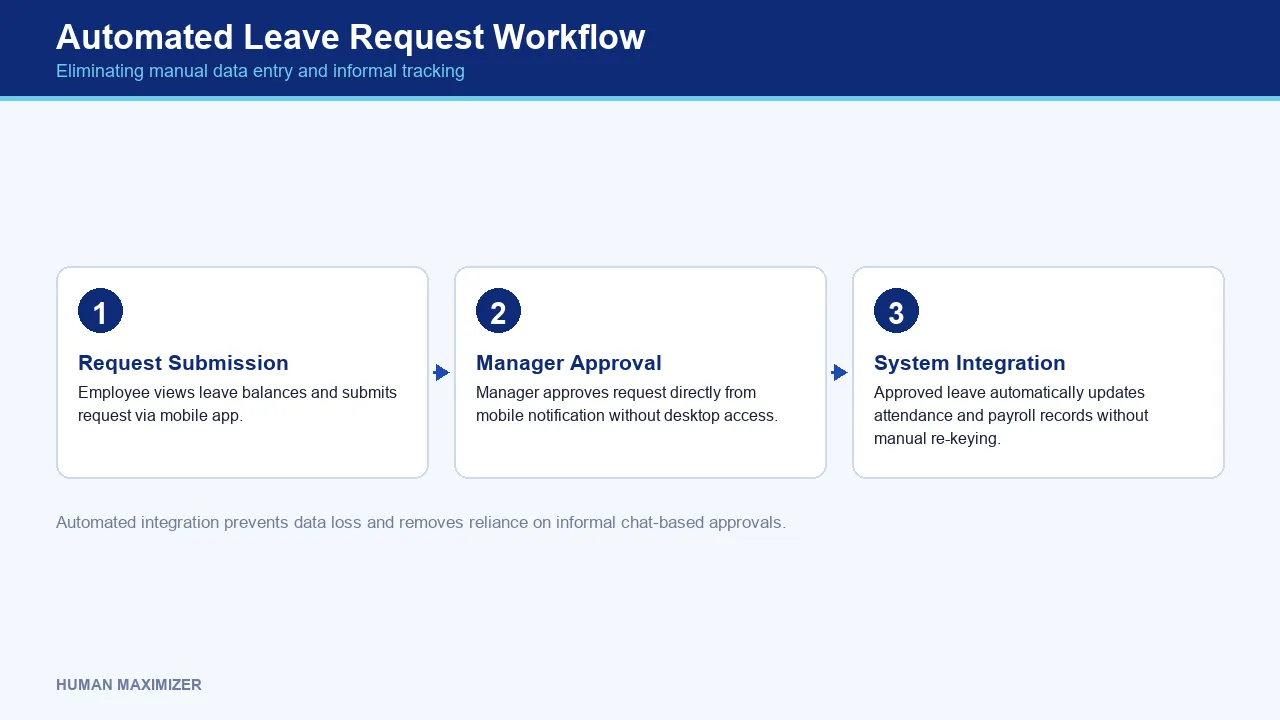
A leave request app earns its place when the employee sees earned, casual and sick balances on the same screen as the request form, when the manager can approve from the notification without opening a desktop, and when the approved leave lands in attendance and payroll without anyone re-keying it. Leave Management that stops short of that last step has moved the paperwork, not removed it. Informal workarounds feel harmless right up until the person who knew them resigns.
Queries follow the same logic. Ticket Management gives employees a place to raise leave, payroll and policy questions with SLA timers and escalation rules, so pending, assigned and resolved items are visible instead of scattered across WhatsApp and phone calls. HR stops being a search function over their own inbox. If you are still mapping what belongs on the employee's side of the wall, our guide to employee self-service portals covers the full scope.
Security When HR Data Lives on a Personal Phone
Indian companies overwhelmingly run BYOD. Salary, Aadhaar, PAN, bank details and performance records end up on handsets the company does not own, which makes the security question a legitimate one rather than a procurement formality. The Digital Personal Data Protection Act, 2023 sets obligations on how personal data is processed and secured; treat mobile HR as in scope for it, and design accordingly.
The controls worth insisting on are unglamorous, and they are easy to check before you sign:
- Single-use, time-bound password reset links — with a clear distinction between "expired" and "already used", so the employee knows whether to request a new link or simply log in.
- A security notification after every password change — the employee's own tripwire if they did not initiate it.
- Rate limiting on the reset endpoint — enough to kill account-enumeration attempts without locking out someone who genuinely lost the email.
- Device-scoped logout and one-device binding — so signing out on one handset does not silently leave a session alive on another, and one account cannot roam across phones.
- Role-based visibility — a manager sees their team's leave balances, not the company's salary register.
None of this appears in a sales deck. All of it appears in an incident.
Reporting is the other half of trust: 71% of HR leaders say their current HRMS cannot generate real-time compliance reports without manual data extraction. If pulling a register means exporting to Excel, your access controls end at the point of export.
Choosing an HR App for Staff in a Small Business
Search this category and you will meet the same ranked lists of vendors, scored on feature counts. Those lists cannot know your workforce shape, which is the only variable that actually decides this. Three archetypes, honestly stated:
Biometric-hardware-first systems are strong where everyone enters through one gate, weak the moment staff are distributed. Standalone mobile attendance apps are cheap and quick to deploy, but they leave payroll as a manual import, which is where the errors come from. A unified, cloud-hosted HRMS with a full-function mobile app costs more per user and takes longer to configure, but attendance, leave and payroll share one record.
For a small business, three practical questions decide it: does the app work on the cheapest Android handset your staff actually carry; does attendance flow into payroll without an export step; and can you switch modules on and off as you grow. On the last point, Human Maximizer is priced per employee and depends on which modules are enabled, from ₹49 to ₹112 per user per month on our published plans, with a free tier to start. Implementation averages 7 to 10 days across 46 deployments through July 2026, and employee self-onboarding brings a new joiner's paperwork down from 5 to 7 days to 1 to 2. Both iOS and Android builds matter, but in most Indian SMEs the Android build is the one the bulk of the workforce carries, so evaluate the product on that build rather than on the iPhone the demo runs on.
Where a Mobile HR App Genuinely Falls Short
Mobile is not the right surface for everything, and pretending otherwise is how rollouts lose credibility.
Bulk work belongs on a desktop. Running a full payroll cycle, correcting a month of attendance across 200 employees, or configuring a salary structure is faster and safer on a large screen; a phone is for approving, checking and submitting, not for administering.
Sensitive conversations should not be compressed into an app flow. A POSH complaint, a performance improvement discussion or an exit conversation needs a human process behind the ticket, and a system that closes the loop with an automated status update has handled the record while mishandling the person.
And an app cannot fix a policy nobody wrote down. If your leave rules are inconsistent across branches, mobile self-service will surface that inconsistency to every employee simultaneously, which is uncomfortable but useful. Fix the policy first.
Frequently Asked Questions
Can an HR mobile app track attendance without a network connection? A well-built one can. The punch is stored on the device with its timestamp and location and syncs when connectivity returns. Test this in aeroplane mode during your evaluation rather than taking it on trust, because plenty of apps simply fail the punch silently.
How does a mobile HR app help with payroll and statutory compliance? It shortens the distance between what happened and what gets paid. When attendance and leave feed payroll directly, PF, ESI, professional tax and TDS are calculated on accurate inputs, and employees can check their own deductions monthly instead of at year end.
Is it safe to access payslips and personal data through a mobile app on a personal phone? Yes, provided the controls are right: role-based access, device binding, time-bound single-use password reset links, security notifications on password change and encrypted transmission. Under the Digital Personal Data Protection Act, 2023, the obligation to secure that data sits with the employer, not the vendor alone.
What should an employee self-service portal do at minimum? Attendance, payslip download, leave application with visible balances, personal detail updates, document access and a query channel with a trackable status. If any of those needs an email to HR, the portal is incomplete.
Conclusion
Go back to the sales executive on the local train with one free thumb. Nothing about his situation changes because you bought software. What changes is whether marking attendance takes him one tap or a phone call, whether his PF deduction is something he can see on the 5th or something he queries in March, and whether his leave request has a status or a silence. Run the One-Thumb Test on your current app this week, on the cheapest handset in the building. The tasks that fail it are already costing you HR hours you have not counted, and they will keep costing them every month until someone measures the gap. Want an HR app your field staff will actually open on day 30? Talk to our team.
About the Author & Reviewer
Insha Hamid — Head of HR in Research & Content, Human Maximizer
Insha Hamid heads HR research and content for Human Maximizer at Razor Infotech, covering people operations and Indian workplace compliance — translating regulatory change and workplace research into guidance HR teams can act on.
Connect on LinkedIn
Reviewed & approved by Sameer Hameed — Founder & Chairman, Razor Infotech
Sameer Hameed is the Founder & Chairman of Razor Infotech, where he is guiding the creation of Human Maximizer. An entrepreneur across technology, real estate, mining and travel, he builds organisations on clarity, trust and responsible growth — on the belief that businesses grow only when the people behind them grow.
Connect on LinkedIn
Human Maximizer is built by Razor Infotech in New Delhi, India (founded 2019). About Human Maximizer.
Keep reading
HR Strategy
Modular HRMS India: Modular HRMS Software
How modular HRMS software allows your business to scale efficiently by adding or removing features as your team grows. Learn to optimize your HR...
16 min read
HR Strategy
HRMS Pricing Model India
The financial impact of per-employee versus fixed-fee structures. Learn how to evaluate HRMS pricing models in India to ensure long-term cost...
15 min read
HR Strategy
HRMS Support After Implementation
The essential service levels and technical assistance you should demand from your vendor regarding HRMS post-implementation support for your business.
20 min read