
HR Strategy
The Handover Nobody Plans: HRMS Support After Implementation
The essential service levels and technical assistance you should demand from your vendor regarding HRMS post-implementation support for your business.

Nishant Tandon
Co-founder & Lead Partner, Razor Infotech · 20 min read ·
Your payroll run stalls at 10:00 AM on payday because a tax slab change was never reflected in the engine, and the consultant who configured your system three months ago is now billing hours to a different client. You raise a ticket. It auto-assigns to a queue. Meanwhile 300 employees are refreshing their bank apps. What you get as HRMS support after implementation decides whether the purchase was worth it, and it has almost nothing to do with the demo you sat through. At Human Maximizer we built HCM Support as a module inside Core HR rather than an email alias, precisely because this is the gap where good systems quietly fail.
Implementation gets the project plan, the steering committee, the Gantt chart. Support gets a footnote in the contract.
The Post-Go-Live Cliff Is a Handover Problem, Not a Software Problem
There is a specific transition most Indian buyers never negotiate: the implementation team hands you to the support desk. These are different people, with different incentives and often a different SLA. The implementation consultant knew that your Indore plant runs a rotating three-shift roster with a 30-minute grace window and that your Nashik unit does not. The support agent who picks up your ticket in month four knows none of that.
Ask your vendor one question before signing: what, exactly, gets written down and transferred at handover?
A real handover has artefacts. A configuration document listing every rule that was customised for you, with the business reason behind each. A named account manager who was present during at least the final two weeks of implementation. An escalation path with a human name and a phone number, not a generic support inbox. And a defined window, typically 30 to 60 days after go-live, during which the implementation team stays reachable in parallel with the support desk.
What a Weak Handover Actually Costs You
When configuration knowledge lives only in a departed consultant's head, every subsequent change becomes archaeology. Someone has to reverse-engineer why overtime is calculated the way it is before they can safely change it. That is how a two-hour fix becomes a two-week investigation, and it usually happens during a month-end close when you have the least tolerance for it.
Negotiating SLAs That Survive an Indian Payroll Cycle
Most HR software support services contracts are written in generic severity tiers copied from an IT helpdesk template. Severity 1 means the system is down, severity 2 means a major function is impaired, and everything minor lands in severity 3. That framing fails Indian payroll teams for one reason: your risk is not distributed evenly across the month.
Payroll compliance in India is calendar-locked. PF payment and ECR filing are due by the 15th of the following month, and a payroll engine defect discovered on the 13th is categorically not the same problem as the identical defect discovered on the 2nd. Your SLA should say so.
Here is what we would push a vendor to commit to in writing:
- A payroll-critical window. Name the dates, typically the 25th to the 7th, plus the two days before every statutory filing deadline. Inside that window, any defect touching salary calculation, statutory deduction or bank file generation is automatically top severity, regardless of how many employees it affects. One employee's PF being wrong is a compliance failure, not a minor issue.
- Response time versus resolution time, stated separately. A four-hour response commitment means nothing if resolution is open-ended. Ask for a target resolution and, more usefully, a mandatory escalation trigger: if unresolved in X hours, it moves to a named senior engineer automatically.
- A statutory-change commitment. When a state revises professional tax or the Centre changes a slab, how many working days until your engine reflects it? Get a number. Professional tax is constitutionally capped at ₹2,500 per year but the slabs and the states that levy it vary, and a vendor without an India compliance function will always be reacting late.
- Named contacts with named backups. An account manager who is on leave during your payroll week is functionally not an account manager.
The clause buyers most often skip is the one that matters most: what happens when the vendor misses the SLA. If there is no service credit, no escalation to a commercial owner and no exit right after repeated breaches, then the SLA is a description of intent rather than an obligation.
HRMS Support After Implementation: Standard Support Versus Managed Services
These two things get sold with similar language and they are not the same purchase.
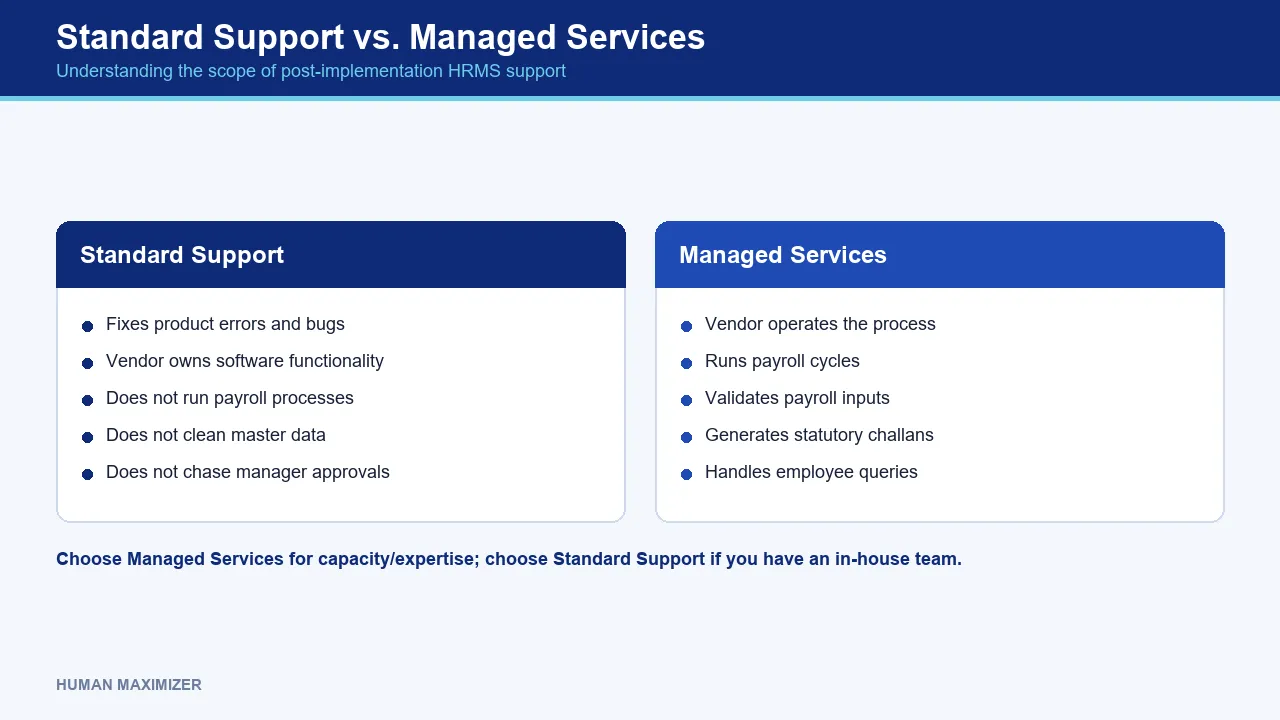
Standard vendor support fixes the product. If a screen throws an error, a report calculates wrongly or a module stops syncing, the vendor owns it. Standard support does not run your payroll, does not clean your master data, and does not chase your managers for pending approvals. You raise a ticket describing a defect; they fix the defect.
Managed services means someone else operates the process. The vendor's team, or a third party, runs the payroll cycle, validates inputs, generates challans and handles employee queries. You are buying capacity and expertise, not just repairs.
The mistake that shows up most often is a company buying standard support while mentally expecting managed services. They assumed the vendor would "handle payroll", then discover in month two that the vendor's obligation ends at the software behaving correctly and that nobody on the vendor side is responsible for the fact that attendance exceptions were never approved.
How to Decide Between Them
Managed services makes sense when you have fewer than one full-time payroll person, when you operate across multiple states with different professional tax and labour welfare fund rules, or when your payroll knowledge sits with a single individual who is a resignation letter away from being a continuity crisis.
Standard support is sufficient when you have an in-house team that already understands your own compliance obligations and simply needs a product that works and a vendor that fixes it fast. Buying managed services in that situation is paying someone to do work you were going to do anyway.
Between the two, there is a third arrangement worth asking for: standard support plus a defined number of assisted payroll cycles. Two or three months of the vendor sitting alongside your team during the run, then a clean handover. It costs less than a managed contract and transfers knowledge instead of renting it.
Whichever model you buy, note what neither of them covers by default. Both assume the data underneath is correct, and after a migration that assumption is usually the weakest thing in the building.
The Ghost in the Machine: Post-Migration Data Errors
Migration errors do not announce themselves at go-live. They surface later, in the specific circumstance that exposes them, and by then everyone has stopped looking.
The classic Indian example is date of joining. If a legacy system stored joining dates inconsistently and a few hundred records migrated with the wrong year or a swapped day-month format, nothing breaks on day one. It breaks when someone crosses five years of service and gratuity eligibility is calculated wrongly. Gratuity qualifying service is five years of continuous service, waived on death or disablement, and the formula is 15 days' wages × completed years ÷ 26. A bad joining date corrupts every part of that.
Other silent failures follow the same pattern. Leave balances migrated as of the wrong cutoff date, only discovered at year-end encashment. Employees whose basic + DA sits near the ₹15,000 PF wage ceiling mapped into the wrong contribution treatment. Nominee records that migrated blank and are noticed only when a claim is filed.
The Post-Migration Audit Worth Running
Run this in the first 90 days, while the vendor is still contractually close and before the legacy system is decommissioned:
- Reconcile headcount three ways. Legacy active count, new system active count, and the count on the last payroll register you ran before cutover. Any mismatch is a person, and a person is a payroll problem waiting.
- Run a parallel payroll for one full cycle and compare line by line, not on the gross total. Two errors of opposite sign net to zero at the summary level and are individually wrong.
- Sample-test the boundary cases, not the average employee. Test the people near the ₹21,000 ESI gross wage threshold, those approaching five years of service, those on loss-of-pay, those with mid-year salary revisions, those in states with professional tax. The employee whose record migrates cleanly teaches you nothing.
- Verify master data that nothing currently reads. Nominee details, emergency contacts, bank IFSC codes for employees who have not been paid since migration, and PAN-Aadhaar linkage fields. These fail silently for months.
- Keep the legacy system readable, not just archived, for at least two full statutory cycles. When a discrepancy surfaces in month five, the only way to settle it is to look at what the old system actually held.
Write down who fixes what. A migration defect belongs to the implementation team, a product defect to the support desk, and a data-entry error your own team made after go-live belongs to you. Deciding this at the time of the dispute is how relationships sour.
Managing Indian Labour Law Updates Without a Fire Drill
Statutory change is the part of HRMS vendor maintenance that separates a genuine India product from a global platform with an India module bolted on.
Compliance reporting is also where the manual work sneaks back in. A system that requires an export-and-rework step before every filing has not really automated compliance; it has relocated it to a spreadsheet where nobody audits it. This is not a rare defect either: 71% of HR leaders say their current HRMS cannot generate real-time compliance reports without manual data extraction, according to SHRM's 2024 HR Technology Survey. Worth checking before you sign, because it is invisible in a demo and painfully obvious on the 14th of the month.
Ask your vendor three concrete questions:
Who inside the vendor watches for statutory changes? Not "we monitor regulations", which every vendor says. Is there a named team whose job that is? At Human Maximizer a dedicated in-house compliance team tracks Indian statutory changes for the platform, which is why we are comfortable being asked this question in a procurement conversation.
How does a change reach the engine? Is it a platform-wide update the vendor pushes, or a configuration change you are expected to make yourself? Both are legitimate models. Confusion between them is not, and it usually surfaces the month a slab changes and each side assumed the other had handled it.
How are you told it happened? A release note buried in a portal nobody logs into is not notification. You need it in a channel your payroll owner actually reads, before the cycle in which it applies.
One honest caveat: no HRMS makes you compliant, it only applies rules correctly and keeps an audit trail. Deciding whether a particular allowance counts as wages under the Code on Wages, which expects basic pay to be at least half of total remuneration, is a judgement call your finance lead or a labour law advisor makes. The software then enforces that decision consistently, without making it for you. If you are still comparing vendors on this dimension, our analysis of what separates the best HRMS software in India goes into how compliance depth gets hidden behind feature lists.
Building the Internal Support Desk You Actually Need
Most vendor ticket volume in the first six months is questions rather than defects. "How do I apply for half-day leave?" "Why is my March payslip showing a different PF amount?" "Where do I upload my rent receipts?" Routing those to your vendor is slow and it trains your employees to see the vendor as their HR department.
Sort incoming queries into three buckets and route each differently.
Tier 1, the how-do-I questions. These belong to a trained internal owner, usually an HR executive, answering from a maintained FAQ. Expect this to be the large majority of volume in the first quarter and to fall sharply once employees have completed one full cycle of leave application, payslip download and reimbursement claim on the new system.
Tier 2, the configuration questions. "We need a new leave type for a Nashik-only festival holiday." "Overtime should be calculated differently for the night shift." These need someone internally who understands both your policy and the system's configuration screens. This person, your system owner, is the single most important internal role and the one most companies fail to name.
Tier 3, genuine product defects. Only these go to the vendor, and they should arrive with a screenshot, an employee code, the exact steps, and the expected versus actual result. A well-formed ticket resolves in a fraction of the time of "payroll is showing wrong".
Our own Ticket Management module exists for tier 1 and tier 2: employees raise leave, payroll and policy queries in one place, HR tracks resolution against SLA timers, and escalation rules move anything stuck. It replaces the fifteen WhatsApp messages your HR manager fields before every payroll close with something you can actually measure. And it produces the data you need for the next renewal conversation: if 40 tickets a month are all about the same confusing screen, that is a product conversation rather than a training one.
The system owner role needs protecting. Name a backup, document what they know, and do not let that knowledge live in one person's head. That is the same failure as the vendor-side handover problem, reproduced internally.
Measuring Whether HR Tech Implementation Success Actually Happened
Go-live is the start of the measurement period, not the finish line. Four things are worth tracking, and none of them are "user satisfaction score".
Payroll accuracy. Count corrections, off-cycle payments and revised payslips per month. This is the cleanest signal of whether the system is working. Across 24 client implementations we reviewed in July 2026, monthly payroll corrections fell from 15 to 3, which is the mechanical consequence of attendance, leave and Payroll reading the same record rather than three exports reconciled by hand.
Time to close payroll. Measure it in hours from input freeze to bank file. Across 32 implementations reviewed in the same period, the first payroll cycle after go-live took about four hours, against two days on the previous system. Measure your own before and after; the delta is your actual return.
Self-service adoption, measured on the right action. Login counts are close to meaningless. Track the share of leave applications submitted by employees themselves rather than by HR on their behalf, and the share of payslips downloaded rather than emailed. Those tell you whether behaviour changed. Our comparison of manual leave tracking against an HRMS works through where those manager hours actually go.
Ticket mix over time. Total ticket count falling is good. Total count falling while the proportion that are genuine defects rises is better, because it means training worked and you are now only dealing with real product issues.
Here is a calculation you can run today rather than trust. If reconciling attendance exceptions against leave records takes roughly 30 seconds per employee per month, then for 400 employees that is 200 minutes, a little over three hours, every single month, on one task. Twelve times a year, that is about 40 hours. Substitute your own rate, and unless your team is dramatically faster than 30 seconds a record, the shape of the answer does not change. That is the number to put next to your annual subscription cost, not a vendor's ROI slide.
For context on what a realistic deployment period looks like before any of this measurement starts, our HRMS implementation timeline guide covers where the six-month projects go wrong. Across 46 implementations between January and July 2026, ours averaged 7 to 10 days.
Adoption Is Won at the First Payroll Run
Training at go-live is necessary and insufficient. People retain what they use, and in the first week nobody uses much.
The moment adoption is actually decided is the first real payroll run on the new system. If payslips are right, arrive on time and are downloadable from the app without asking HR, the system earns credibility that no training deck can buy. If that first cycle has errors, you will spend the next six months fighting the belief that "the new system is wrong", even after it stops being wrong.
Which is why the training that matters is the refresher scheduled two weeks after go-live, when people have hit their first real confusion and have specific questions instead of polite silence. Run it by role: a manager approving leave and reviewing attendance exceptions has almost nothing in common with an employee submitting a reimbursement claim.
One more thing about pilots. Running a pilot with your most cooperative, cleanest-data team feels efficient and teaches you very little. The teams that will break your rollout are the ones with irregular shifts, contractor mixes, and a manager who has been approving leave over WhatsApp for eight years. Pilot with them. A pilot that skips the messy teams gives false confidence about everything that follows.
Configuration should follow adoption data, not the other way round. Six months in, look at which screens generate tickets and which approvals sit pending longest, then change the workflow. Our Leave Management module can be reconfigured as policy changes, and modules can be switched on or off as usage shifts, which matters because the process you designed during implementation was designed before anyone had used the system.
Where Post-Go-Live Support Genuinely Cannot Help
Some problems look like support tickets and are not.
Process disagreement between departments. When finance wants attendance frozen on the 25th and operations wants it open until the 28th, no vendor can resolve that. The hard part of a rollout is rarely the software; it is three departments agreeing on one process. A support ticket raised against that disagreement will be closed as "working as configured", correctly.
Legal interpretation. Whether a specific allowance falls within the statutory definition of wages, or whether a particular contractor arrangement triggers PF liability, is advice your labour law counsel or CA gives. We build the platform to apply the rule you choose, consistently and with an audit trail. We do not choose it for you.
Bad data you keep creating. If employee records are entered inconsistently after go-live, the system will faithfully process inconsistent records. Support can fix a defect. It cannot fix a habit.
Under-resourcing dressed up as a product problem. If one person is running payroll, compliance, recruitment and grievances for 500 employees, better software helps at the margin. It does not substitute for a second person, and any vendor who tells you otherwise is selling.
Frequently Asked Questions
What is the difference between standard vendor support and managed services? Quick test: read the contract and count the verbs. Standard support says fix, resolve, restore, and is usually bundled into the per-user licence. Managed services says process, run, file, reconcile, and is priced separately, often per employee per cycle. If you cannot find operational verbs anywhere in the document, you have bought standard support.
Which statutory dates should be hard-coded into our support calendar? Three anchors cover most of it: PF payment and ECR filing by the 15th of the following month, ESI applicability at the ₹21,000 monthly gross wage threshold, and full and final settlement expected within two working days of the last working day under the Code on Wages. Put an SLA escalation trigger two working days ahead of each. Add your own state's professional tax filing date, since that one is not uniform.
What should we ask a vendor before signing the support annexure? Four things, and get each in writing: the named account manager plus their backup, the committed turnaround from a statutory notification to the change appearing in your engine, the remedy when an SLA is missed, and how long the implementation team stays reachable after go-live. A vendor who will commit to three of the four is negotiable. One who will commit to none has told you what support will feel like in month six.
How long should the implementation team stay involved after go-live? Ask for at least one full payroll cycle with the implementation team available in parallel with the support desk, and preferably two. Migration errors and configuration gaps surface during a live run, not during testing, and the people who configured your system diagnose them far faster than a support agent seeing your setup for the first time.
Conclusion
Go back to that stalled payroll at 10:00 AM on payday. The failure was not the tax slab change, which was public and predictable, but that nobody had agreed in writing who was responsible for making the engine reflect it, by when, and who to call at 10:01 when it had not happened. That agreement costs nothing to negotiate before you sign and is close to impossible to obtain afterwards.
Our average client tenure is three years, and that has less to do with the demo than with the support relationship after go-live, backed by 24x7 availability from our in-house team and a compliance function whose job is watching what changes in Indian statute. If you want to run the 90-day post-migration audit in this article against your own system and find out what actually migrated, bring it to our team before your legacy database gets switched off.
About the Author & Reviewer
Nishant Tandon — Co-founder & Lead Partner, Razor Infotech
Nishant Tandon is Co-founder and Lead Partner at Razor Infotech, with over a decade in IT, customer support and business operations, helping SMEs achieve cost efficiency, stronger customer experience and scalable, sustainable growth.
Connect on LinkedIn
Reviewed & approved by Sameer Hameed — Founder & Chairman, Razor Infotech
Sameer Hameed is the Founder & Chairman of Razor Infotech, where he is guiding the creation of Human Maximizer. An entrepreneur across technology, real estate, mining and travel, he builds organisations on clarity, trust and responsible growth — on the belief that businesses grow only when the people behind them grow.
Connect on LinkedIn
Human Maximizer is built by Razor Infotech in New Delhi, India (founded 2019). About Human Maximizer.
Keep reading
HR Strategy
How to Implement HRMS Software in Indian Businesses in 2026?
Failing to implement HRMS? Find out how long HRMS implementation takes to automate payroll, compliance & improve employee experience. Book a demo with Human Maximizer.
5 min read
HR Strategy
Fix Broken HR Processes Before Automating: A Guide
Automating a broken process only makes the mess faster. How to audit HR workflows, find where automation leaks, and fix the process first.
9 min read
HR Strategy
Fake GPS Attendance Detection
How advanced geo-fencing attendance software identifies fake location apps and GPS spoofing to ensure accurate, tamper-proof field force tracking...
20 min read