
HR Strategy
Can Geo-Fencing Catch a Faked Coordinate? Fake GPS Attendance Detection
How advanced geo-fencing attendance software identifies fake location apps and GPS spoofing to ensure accurate, tamper-proof field force tracking...

Nishant Tandon
Co-founder & Lead Partner, Razor Infotech · 20 min read ·

A geofence checks one thing: whether a coordinate falls inside a circle. It does not check whether that coordinate is real. Those are different questions, and most attendance software only asks the first one. Which is why a field executive sitting in a café in Indiranagar can show up as "Present" at a tech park in Whitefield, with a green tick and a clean row in the muster. The phone reported a location. The system believed it. Serious fake GPS attendance detection begins at the moment you stop trusting the coordinate on its own, and our Geo-Fencing module is built on that assumption rather than on faith in the GPS pin.
Here is the part most write-ups on this topic skip. The interesting signal is usually not the location itself, but everything around it: how the coordinate behaves over time, what the device's other sensors report, whether the operating system is being told to lie, and whether the phone in question is one you control at all. Read those together and spoofing becomes obvious. Read the coordinate alone and it never will be.
Why a Geofence Alone Cannot Catch a Faked Coordinate
A geofence is a boundary test. The employee's device supplies a latitude and longitude, the system measures the distance to the office point, and the punch is allowed or blocked. That logic is sound and it solves a real problem: it stops the sales executive from punching in at home and driving over at eleven. What it cannot do is interrogate the input.
Mock location is a documented Android feature rather than a hack, sitting in Developer Options under "Select mock location app," originally built so developers could test map-based software without walking around a city. Enable it, install any of a dozen free apps from the Play Store, drop a pin on the office, and every app on the phone that asks for GPS gets the fake coordinate back. Including the attendance app. On iOS the path is harder and usually needs a jailbreak or a tethered desktop tool, which is why employee location spoofing skews heavily Android in Indian workforces.
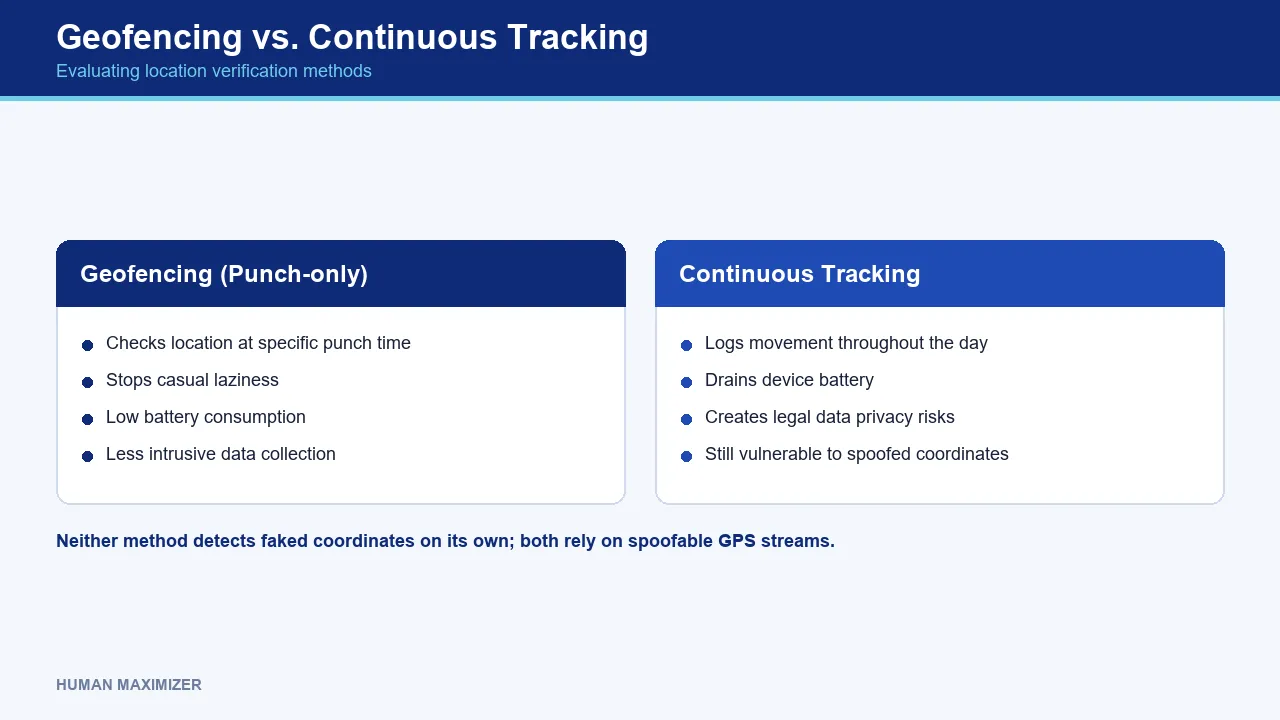
So the honest answer to "can geo-fencing attendance detect a fake location?" is: not on its own. A radius check with no device-integrity check is a lock with the key taped to the door. It stops casual laziness and nothing more. If you want the mechanics of how boundaries and punch rules actually work before going further, our explainer on how geofencing attendance works for Indian teams covers the foundation this article builds on.
Why continuous tracking makes it worse
The instinctive fix is to track continuously instead of at punch moments. Resist it. Continuous GPS drains battery, generates a movement log you now have to defend legally, and still consumes the same spoofable coordinate stream, so you simply receive faked locations more often. It converts a verification problem into a surveillance problem without solving the verification problem. Sampling at the punch moment and checking how the coordinate behaves gets you far more signal for far less intrusion.
Beyond the Coordinate: How Fake GPS Attendance Detection Actually Works
Think of it as four independent corroborations rather than one clever test. Each can be defeated on its own. Together they are hard to defeat simultaneously, and defeating all four at once takes effort so far beyond "downloaded a free app" that it changes who you are actually dealing with.
The mock-provider flag
Android exposes whether a location reading came from a mock provider. The reading itself carries the flag. Any attendance app that reads location and ignores that flag is choosing not to know. This single check catches the overwhelming majority of casual spoofing, because most people running a fake GPS app have no idea the flag exists.
Device integrity and device binding
Rooted Android devices and jailbroken iPhones can spoof at a level where the OS flag stops being reliable, because the layer reporting the flag is itself compromised. Root detection therefore belongs inside location verification rather than beside it.
Device binding is a separate control, and it is the one routinely confused with biometrics, so it is worth separating cleanly. Binding answers which phone. A biometric or liveness check answers which person. The order is not cosmetic: binding is the prerequisite that makes the biometric check mean anything. On an unbound handset, one phone can carry several employees' logins, which quietly turns it into a shared punching station and hands you a genuine coordinate every time. The capture pipeline has the same dependency. A rooted, unregistered device can feed a virtual camera stream into the app, so the selfie you are trusting never passed through a lens at all. Bind first, one employee to one registered device, and only then add the face check. Reverse that order and you are authenticating a person through a channel you never verified.
Sensor and physics coherence
This is where detection gets genuinely interesting, and where most vendors stop. A phone carries far more than a GPS receiver: an accelerometer, a gyroscope, a magnetometer, a barometer on many models, plus Wi-Fi and cell radios that see the surrounding environment. Real movement produces correlated signals across those sensors. Faked movement usually does not.
A device reporting that it just travelled eight kilometres across Bengaluru while its accelerometer recorded no meaningful motion has told you two contradictory things. A coordinate that sits at exactly the same six-decimal value for forty minutes is behaving unlike any real GPS fix, which always jitters. A device whose GPS says Whitefield while its visible Wi-Fi networks and serving cell tower point somewhere else entirely has a story problem. None of these is proof on its own. All of them are evidence.
Behavioural history and impossible travel
People have patterns. The same executive punches in from the same three client sites and moves between them at speeds a car can actually achieve. A punch that appears 400 km away eleven minutes after the previous one is an arithmetic problem before it is a location problem. Impossible-travel checks need no new hardware and no new permission, only the attendance history you already hold.
Layering matters more than picking the best single check. No one of these four closes a case by itself. Read together, they make a faked punch expensive to sustain, which is the practical goal.
The ceiling: software checks versus hardware attacks
Be honest with yourself about the ceiling. Every corroboration above is software reading software-reported signals. Someone with hardware-level GPS signal injection can, in principle, feed a device coordinates that look real to every layer at once. That scenario is vanishingly rare in a workforce context, and budgeting for it is a mistake. You are not defending against a state actor. You are defending against a free Play Store app and thirty seconds in Developer Options.
What Spoofed Attendance Actually Costs You
Attendance fraud is rarely discussed in rupees, which is why it never gets prioritised. Model it instead of guessing, and it gets uncomfortable fast.
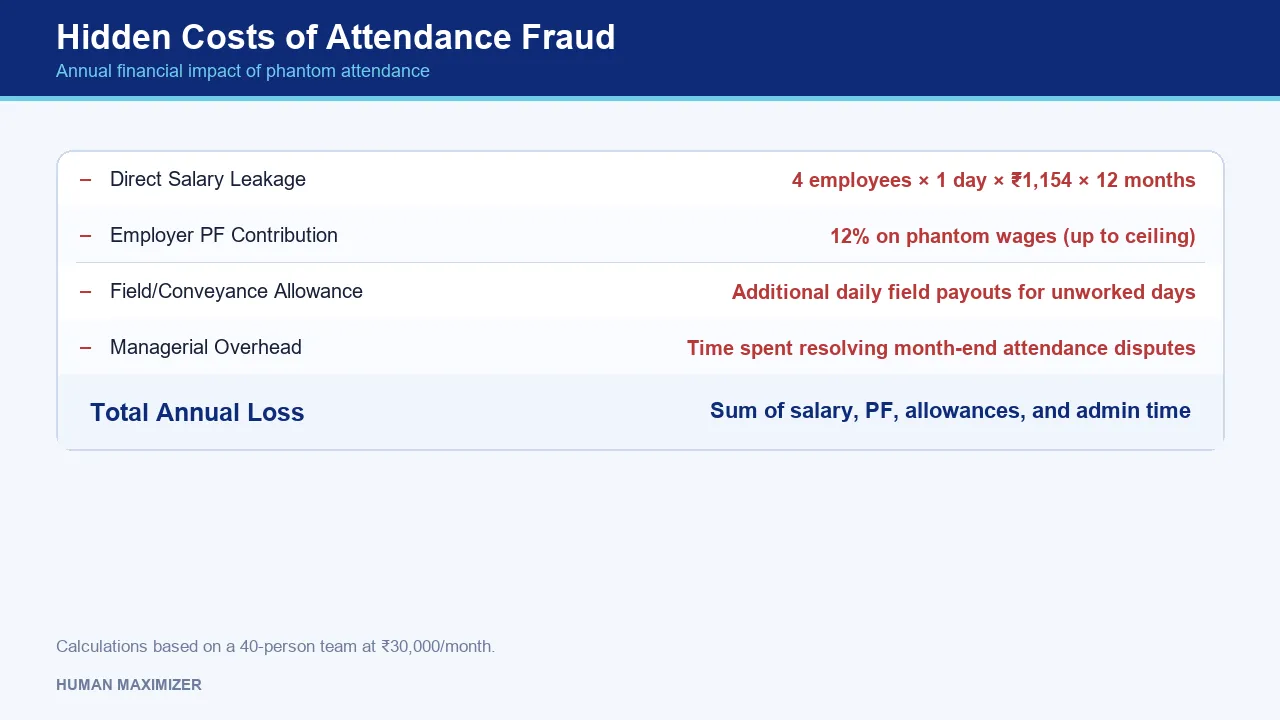
Take a field team of 40 people at ₹30,000 a month gross, on a 26-day cycle. That is roughly ₹1,154 per attended day. Suppose spoofing lets four of them claim one unworked day a month each. Four days × ₹1,154 is about ₹4,600 a month, or ₹55,000 a year. Adjust the headcount, salary or frequency to your own numbers; the shape of the answer does not change.
Now add the parts nobody models. Those phantom days flow into the salary register, so provident fund gets computed on wages for work that never happened. The Employees' Provident Fund Organisation caps the employer's liability at a wage ceiling of ₹15,000 a month of basic plus DA, and the ECR falls due on the 15th of the following month. You are filing a return built partly on a fiction, and correcting it later means a revised ECR rather than a quiet edit. Add per-day conveyance or field allowance and the real figure is comfortably double the salary-only one. Add the manager hours spent arguing over a disputed row at month-end, which nobody costs at all.
Buddy punching sits in the same bucket and is usually cheaper to execute than spoofing. If two employees share a device or credentials, the GPS reading is completely genuine: the geofence sees a real person at a real office and approves. This is precisely why device binding and per-employee registration come before any biometric layer rather than alongside it. Without them, the strongest fake location detection on the market validates a coordinate that was never in question. Our guide to employee attendance tracking software covers the registration side of this in more detail.
Is It Legal to Track Employee Location in India?
This is the section competitors skip, and it is the one HR actually gets asked about.
Location tracking for attendance is lawful in India, with conditions, and those conditions tightened under the Digital Personal Data Protection Act, 2023, administered by the Ministry of Electronics and Information Technology. Location is personal data. Processing it needs a lawful basis, and for most employers that basis is consent which is free, specific, informed and capable of being withdrawn, collected through a notice the employee can actually read rather than a permission dialog they tapped through during onboarding.
Two principles do most of the practical work. Purpose limitation: a coordinate collected for attendance cannot quietly become a route history or an input to a performance review, because that is a different purpose and your original consent does not stretch to cover it. Data minimisation: capture the coordinate at the punch moment, not a continuous trail. Every extra data point you hold is one more you must justify and eventually delete.
Beyond the statute, get the paperwork right. Name location tracking explicitly in the employment agreement and the attendance policy rather than leaving it as a verbally communicated rule. Say which roles it applies to, what is captured, how long it is retained and who can see it. Then tell people what happens when the system flags something, because an employee who first learns about spoofing detection from a show-cause notice will reasonably feel ambushed.
A flag starts a conversation, not a deduction
One rule we hold to: a spoofing flag should never trigger an automatic salary deduction or disciplinary action. It triggers a review by a human. Location signals fail for boring reasons, including a bad fix, an OS update, or a phone that spent ten minutes in a basement. Treat a flag as the start of a conversation and the system keeps its credibility. Automate the punishment and the first false positive will cost you more trust than every genuine catch earns back.
BYOD, MDM, and Where Detection Genuinely Breaks
Every claim about fake GPS attendance detection carries an unspoken prefix: on whose device? Your ceiling is set by how much of the phone you control, and most Indian field teams run on personal Android handsets. That is the whole problem in one sentence.
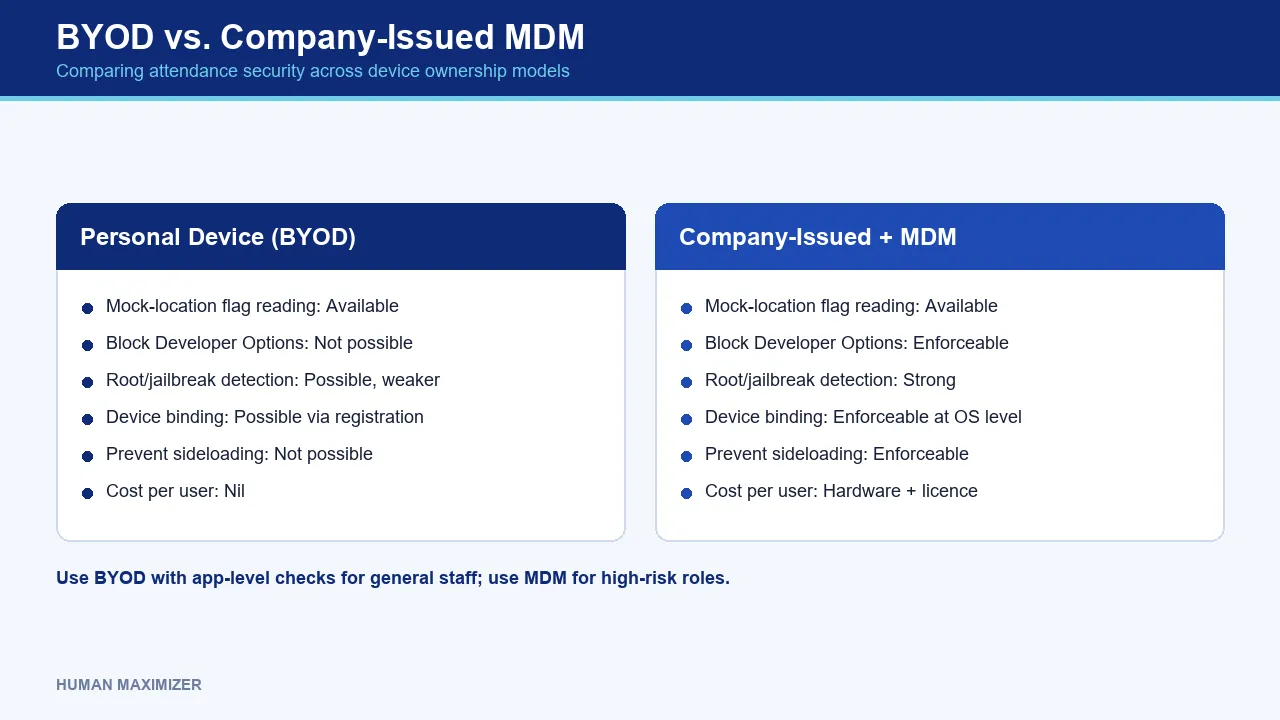
On a company-owned device under Mobile Device Management, you can enforce a lot: block Developer Options, prevent sideloading, require a minimum OS version, detect root reliably, and lock the attendance app to a single registered handset. Detection there is strong because the environment is not adversarial.
On BYOD you get none of that. You cannot practically or ethically mandate what an employee installs on a phone they bought. What you can require is that the attendance app refuses to run when mock location is enabled or the device is rooted, which is a proportionate line: not "we control your phone", but "we will not accept a punch from a device in a state where the location cannot be trusted". Publish that rule before enforcing it.
| Personal device (BYOD) | Company-issued + MDM | |
|---|---|---|
| Mock-location flag reading | Available | Available |
| Block Developer Options | Not possible | Enforceable |
| Root/jailbreak detection | Possible, weaker on rooted OS | Strong |
| Device binding to one employee | Possible via registration | Enforceable at OS level |
| Prevent sideloaded spoofing apps | Not possible | Enforceable |
| Cost per user | Nil | Hardware + licence |
The honest middle path most Indian SMEs land on: BYOD with app-level integrity checks for the general field force, company devices with MDM only for the roles where a faked punch carries real financial or safety consequences. Cash-handling routes. Site safety sign-offs. Our field force tracking guide goes deeper on structuring field staff attendance where you cannot standardise the hardware.
GPS Drift Versus Deliberate Location Spoofing
The most damaging thing a detection system can do is flag an honest employee, and it happens constantly, because dense Indian cities are hostile to GPS.
Multipath error is the culprit. Satellite signals bounce off glass towers and concrete before reaching the phone, so the receiver calculates a position from a signal that took a longer route than the direct one. The result is a fix that can land 50 to 200 metres off in a narrow street between high-rises, worse in a basement parking level, worse again under a metro viaduct or inside a warehouse with a metal roof. The employee is standing exactly where they should be. The phone disagrees.
Drift and spoofing look nothing alike once you know what to compare.
| Signal | GPS drift (honest) | Spoofed location (deliberate) |
|---|---|---|
| Accuracy radius reported by device | Wide, 50m+, often degrading | Often suspiciously tight and constant |
| Coordinate over time | Wanders and self-corrects | Frozen or moves in unnatural straight lines |
| Direction of error | Random, varies by attempt | Consistently toward the office |
| Mock-provider flag | Absent | Present, unless device is rooted |
| Sensor agreement | Motion sensors match reality | Movement claimed with no motion recorded |
| Pattern across employees | Several people at one site affected | One person, one device |
That last row is the one to build a rule on. When five people at the same warehouse all show a wide fix at the same hour, that is the building rather than a conspiracy. When one person's coordinate is pin-sharp and identical to six decimal places three days running while everyone else's wobbles, that is worth a look.
Practically: set radii to the site rather than to a company-wide default. Fifty metres is right for a small office and wrong for a warehouse compound or a 500-metre construction site. Treat the device-reported accuracy value as context, since a punch 60 metres outside a fence, reported with a 90-metre accuracy radius, is statistically inside. And give employees a "punch anyway with a reason" path that records the exception instead of blocking them. A blocked honest employee will find a workaround, and one thing we keep noticing across rollouts is that a workaround used a few times without objection quietly becomes the process nobody wrote down.
How Human Maximizer Handles This in Practice
Take an exception rather than a happy path. A field engineer arrives at a client site in Vadodara and opens the app to punch in. The map modal shows two pins, their current fix and the site point, with the configured radius drawn as a circle and a header bar that stays red until they are inside. It is the same picture the HR reviewer will see later, which removes the entire category of argument that starts with "the app said I was outside".
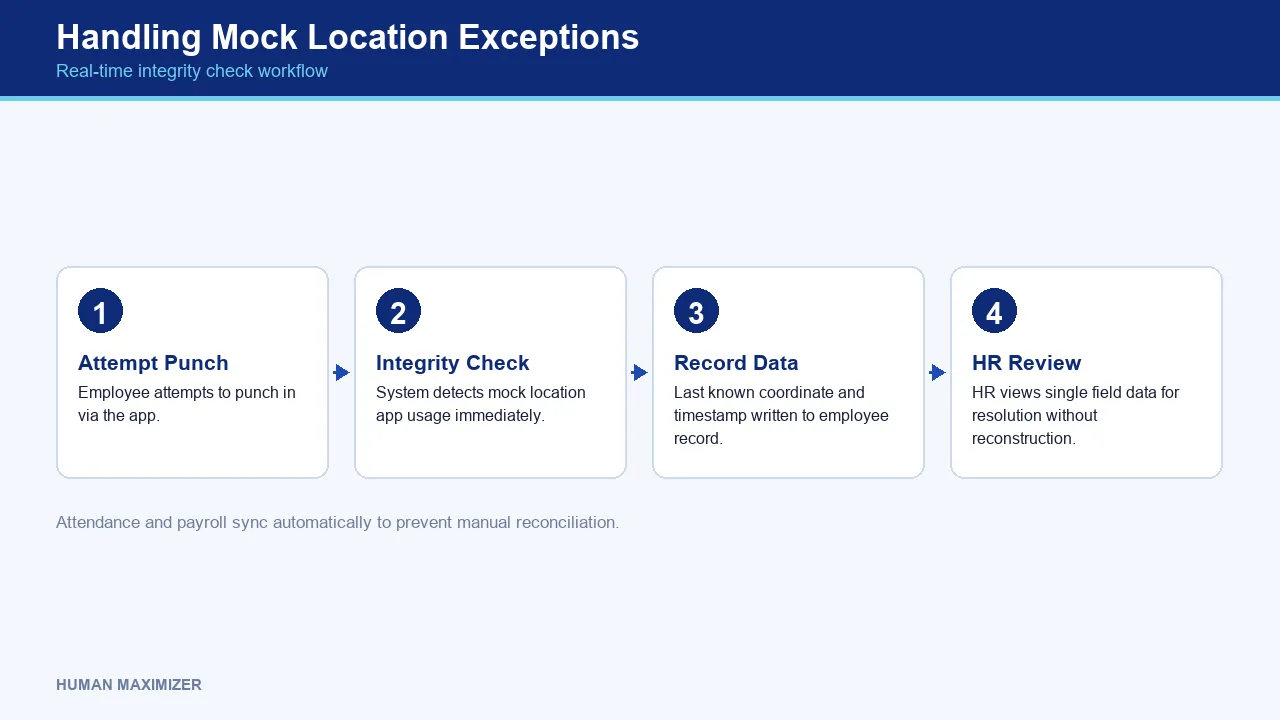
Now the exception. The device is running a mock location app. The punch does not quietly succeed and get investigated at month-end; the integrity check fires at the moment of the attempt. The last known coordinate and timestamp are written to the employee record on every check, so when the query reaches HR three weeks later there is a single field to look at rather than a reconstruction exercise. Because Attendance Management and Payroll sync without manual re-entry, a disputed day gets resolved in one place instead of being corrected twice and then reconciled.
Two configuration details matter more than they sound. Punch-location rules and auto-break geofencing are independent, so an employee can be on "any location" punching, genuinely remote, while still having break tracking active on the days they come into the office. And geofencing is enabled per employee rather than per company, which is the setting most rollouts get wrong: every in-office role enabled with coordinates configured, every field and remote role deliberately not. Anyone marked enabled without office coordinates on their record is a silent failure that produces confusing data for months.
Across 46 implementations between January and July 2026, our average go-live took 7 to 10 days. Two caveats on that number, because it deserves them. It is an internal aggregate from our own delivery records, not a published case study, and we do not name clients or publish their results, so hold it to the standard of an operating benchmark rather than independent proof. It also averages simple and complex rollouts together, and location rules are usually the piece that stretches the timeline. Not because the software is slow, but because deciding which role gets which rule is a policy conversation, and it should be. That work is done by our in-house team, which also staffs round-the-clock support after go-live; there is more on the team behind Human Maximizer if you want the background.
Where This Approach Runs Out
Some honest limits, because a vendor claiming complete coverage is telling you something about themselves.
Underground and enclosed sites. Basement workshops and the interior floors of large plants may have no usable GPS fix at all. No detection method fixes an absent signal. Those sites need a fixed check-in point or a supervisor-confirmed roster instead.
The genuinely determined attacker. A rooted device with hardware-level signal injection can defeat software checks. It is rare and effortful, and if someone on your field team is doing it, attendance is not your main problem.
Sensor coherence is probabilistic. A phone left stationary on a desk while its owner is genuinely at that desk reports the same low-motion profile as a spoofed one. These signals raise questions rather than closing cases. Anyone selling certainty here is overselling.
Consent refusal. An employee who declines location permission cannot be geofenced, and the answer to that is a policy decision about role eligibility rather than a technical workaround. Do not let the software make that call.
Frequently Asked Questions
Can geo-fencing attendance detect fake GPS apps? A plain radius check cannot, because it accepts whatever coordinate the phone hands over. Detection requires reading Android's mock-provider flag, checking whether the device is rooted or jailbroken, and cross-referencing the location against motion sensors and travel history. Ask any vendor specifically whether they read the mock-location flag; plenty of apps do not.
How do HRMS platforms block mock location settings? They cannot switch the setting off on a personal phone. GPS attendance tracking on BYOD is a verification exercise rather than a control exercise: the app can refuse the punch when the flag is set or the device fails an integrity check, and log the attempt for review. Full prevention needs a company-owned device under Mobile Device Management, where Developer Options and sideloading can actually be locked down.
Is it legal to track employee location in India? Yes, for attendance, with informed consent and a clearly stated purpose. Under the DPDP Act, 2023 the data must be minimised to what attendance genuinely requires and cannot be repurposed for route tracking or performance monitoring without fresh consent. Put the policy in writing in the employment agreement rather than relying on an app permission prompt.
What is the difference between GPS drift and location spoofing? Drift is a real signal degraded by buildings: the error points in a random direction and the reported accuracy radius widens. Spoofing produces coordinates that are unnaturally stable, with error that always points helpfully toward the workplace and usually a mock-provider flag attached. Drift also tends to affect several people at one site at the same hour, while spoofing shows up on one device.
How can employers prevent buddy punching via fake GPS? Location verification alone will not stop it, because a colleague punching from the real office produces a genuine coordinate. Start by binding each employee to one registered device, since an unbound handset can host several logins and become a shared punching station. Only then does a second factor at the punch moment, such as a live selfie, do useful work, because it verifies who is present on a device you have already established you can trust.
Conclusion
Return to that green tick. It looked identical whether the engineer was at the site or in a café two suburbs away, and that is the real failure: the record carried no information about its own reliability. Everything above exists to attach a confidence level to that tick. Was the coordinate mocked, was the device compromised, did the phone's own sensors agree with its claim, and does the punch make sense against yesterday's?
Skipping the verification layer costs more than the ₹55,000 in the model above. Under the DPDP Act you are now holding location data on every employee, carrying the notice, retention and deletion obligations that come with it, while getting no verification value in return. Full privacy exposure with zero integrity benefit is the worst position on the board.
Want punch records your payroll can defend at month-end? Book a quick call with Human Maximizer.
About the Author & Reviewer
Nishant Tandon — Co-founder & Lead Partner, Razor Infotech
Nishant Tandon is Co-founder and Lead Partner at Razor Infotech, with over a decade in IT, customer support and business operations, helping SMEs achieve cost efficiency, stronger customer experience and scalable, sustainable growth.
Connect on LinkedIn
Reviewed & approved by Sameer Hameed — Founder & Chairman, Razor Infotech
Sameer Hameed is the Founder & Chairman of Razor Infotech, where he is guiding the creation of Human Maximizer. An entrepreneur across technology, real estate, mining and travel, he builds organisations on clarity, trust and responsible growth — on the belief that businesses grow only when the people behind them grow.
Connect on LinkedIn
Human Maximizer is built by Razor Infotech in New Delhi, India (founded 2019). About Human Maximizer.
Keep reading

HR Strategy
Employee attendance tracking software
Why aggressive surveillance tools damage company culture. Learn how to balance accountability and employee trust using modern field force tracking...
13 min read
Payroll
Attendance Payroll Integration: Sync Myth
Why manual data transfers cause costly salary errors. Learn how automated attendance and payroll integration ensures accuracy and saves hours...
14 min read
HR Strategy
Manual Attendance Register to Digital
Stop wasting time on manual logs. Discover how a digital attendance management system eliminates payroll errors and boosts workforce productivity...
17 min read