
HR Strategy
What Is Geofencing Attendance? How It Works for Indian Teams
How geofencing attendance marks staff present inside a set location, what it can and cannot record, and where Indian privacy law draws the line.

Richa Thakur
Content Writer · 5 min read · · Updated
It is 9:15 AM and Ramesh, a field sales executive at a Delhi-based FMCG distributor, marks himself present on the company attendance app. His manager sees a green tick. His territory is twenty kilometres away. Ramesh is still at home.
Nobody flagged it. Nobody knew. The app confirmed a login. It never confirmed a location.
For companies managing field sales teams, delivery executives, and distributed workers across India, this gap is not rare. It is the default. Buddy punching, inflated field reimbursements, and payroll paid for hours never worked are the direct cost of an attendance system that tracks time but not place.
Geofencing attendance closes that gap. It creates a verified GPS boundary around every work site, and an employee can only mark present from inside it. This guide covers how it works, how to set it up, what Indian law requires, and why it matters more for distributed teams than any other attendance method.
What is Geofencing Attendance?
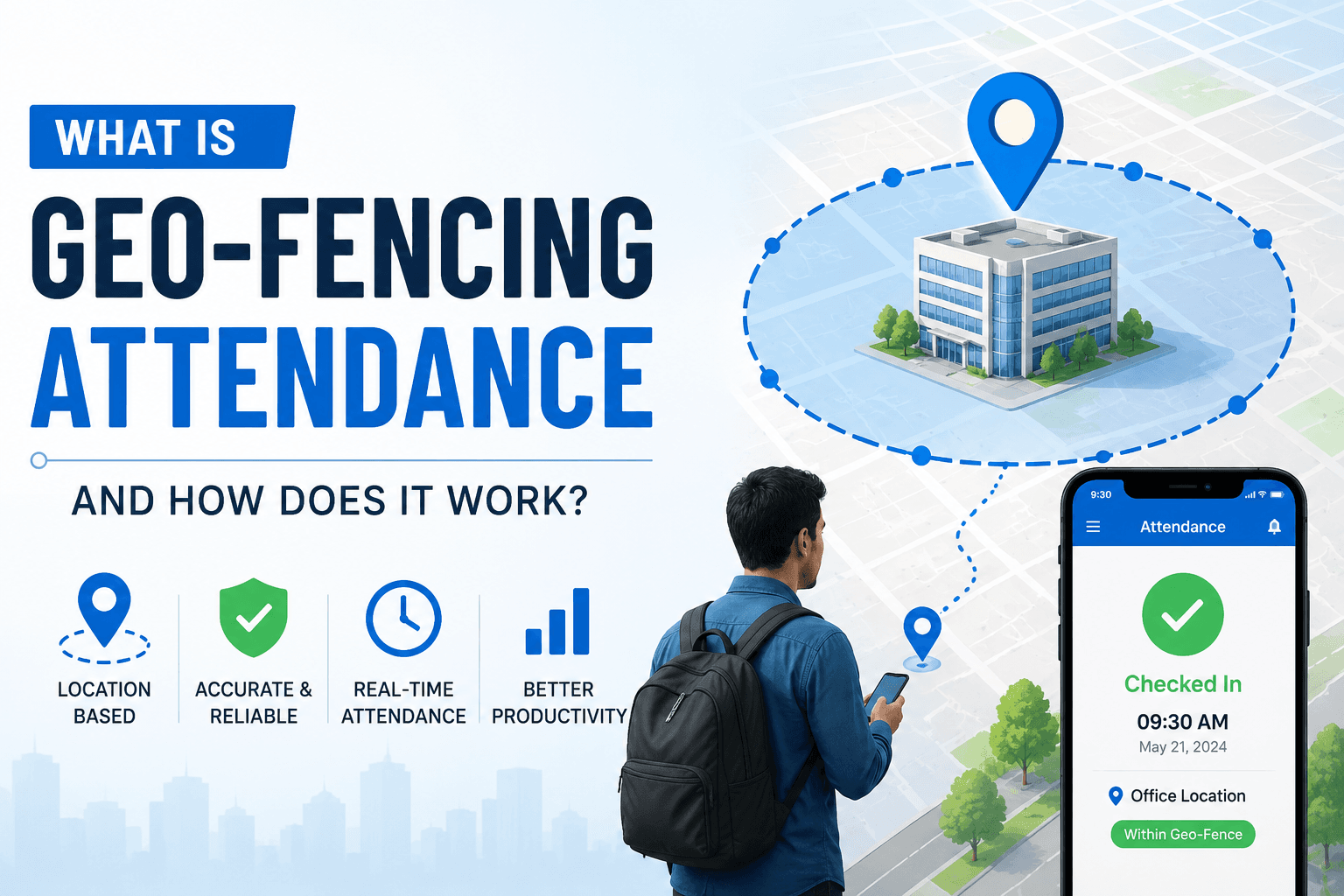
Geofencing is a location based tracking system for attendance that creates a virtual GPS boundary around a workplace or job site. This feature enhances attendance by allowing employees to clock in only when they are inside the designated physical area.
Key Features of Geofencing Attendance:
Virtual boundary setup: Admins draw a geofence radius around each office, site, and territory.
GPS Verified Check-in: Employees can only log in when they are inside the assigned geographical area.
Real-time Location: The app confirms whether the person is physically present at the time of punch-in.
Multi-Site Support: Separate geofence boundaries for warehouses, branches, or client locations.
Auto Check Out: Attendance closes when the employee leaves the defined area.
DPDP Compliance Consent: Location is captured only during shift hours, with documented employee consent, in line with the Digital Personal Data Protection Act 2023.
(Source:Digital Personal Data Protection Act, 2023)
How does the Geofencing Attendance System Work?
The attendance system creates a virtual boundary around the physical workplace by using the GPS, Wi-Fi, or cellular data. Employees can check in and out through their mobile phones, which instantly verifies the live location against the predefined boundary to ensure accurate and live attendance.
At Human Maximizer, we call this the 4-Step Geofence Verification Loop. Every check in on our platform passes through the same four stages before it is logged as attendance.
1. The Setup
Define the coordinates precisely. The system administrators drop a GPS pin around the workplace, including the office, client location, or construction site.
Set the radius and define a perimeter, such as 50 metres for an office or 500 metres for construction sites.
2. The Check-in
After arriving at the office location, the employees punch in through the company’s attendance app on their smartphones.
The app reads the live GPS coordinates for the employee’s device.
3. The Boundary Check
The system checks whether the employee's location matches the predefined virtual fence.
If the employees are inside the assigned location, the system marks present and, when the live location falls outside the defined fence, the system rejects the check-in and flags the attempt.
4. Data Processing and Syncing
The verified check-in data, including date and time, is instantly transferred to the centralised cloud dashboard, so HR and managers can see the real time attendance.
This data automatically calculates working hours and overtime, feeding directly into payroll.
How to Implement a Geofencing-Based Attendance?
Setting up a geofencing attendance system comes down to four decisions: where the boundary sits, how wide it is, what happens when someone checks in outside it, and who sees the data. Here is the step-by-step process.
1. Choose the Right Platform
Explore the different available options in the market and use a dedicated attendance system that supports the geofencing feature.
Set up all the employee information, categorise the workforce based on remote, field, or sales workers.
2. Set Up a Predefined Location
Log in to your admin dashboard and navigate to the attendance settings.
Identify the exact physical address or office location where you want your employees to mark attendance.
Separate geofence boundaries for warehouses, branches, or client locations.
3. Set the Geofence Radius
Configure the geofenced area based on the system-integrated map supported by Google Maps.
Type the address or pinpoint a location displayed on the map, including the exact building or facility.
Adjust the geofence radius based on the flexibility and requirement. You can set a 50-metre radius for office locations and increase the boundary for the construction and field areas.
4. Configure Attendance Rules
Determine what happens when an employee checks in through their smartphone.
The app will automatically block the employee from checking in if they are outside the assigned geographical area.
Create a warning system for an employee. The system allows checking in but flags the exceptions.
The system immediately sends a notification to the managers and records the exact coordinates outside the boundary.
5. Roll Out and Test with a Pilot Team
Before the company-wide rollout, run a two-week pilot with one team, ideally field sales or delivery, and verify that check-ins are logging correctly against the defined radius.
For instance, you can specifically set up a location based attendance tracking for warehouse and field workers.
Instruct your employees to download the company’s attendance tracking app and log in to the system by providing credentials.
Employees must grant the app location permission on their smartphone before the first check-in.
Top 5 Benefits of Geofencing Attendance System
The business case for geofencing attendance is straightforward: you stop paying for hours that were never worked, and your HR team stops spending afternoons reconciling attendance sheets. Here are the five gains that matter most.
1. Eliminates Time Theft and Proxy Punching
It prevents buddy punching by verifying physical presence before logging a check-in. If an employee attempts to clock in from outside the defined boundary, the system rejects the attempt and flags it for HR review. Colleagues cannot mark attendance for one another because the GPS pin is tied to the individual device.
The system restricts employees from checking in early or late and from unauthorised check-outs to align employees with the scheduled work hours.
2. Precise Payroll Processing
Every check-in and check-out includes verifiable location and date data. This transparent process allows the HR and managers to access the real-time attendance and automatically reduces the manual calculations.
It builds employee trust by guaranteeing fair paychecks based on accurate worked hours. It decreases the disputes between the HR managers and employees regarding the paychecks and salary distribution.
For Indian companies, this matters beyond efficiency. Under the Payment of Wages Act 1936 and the Code on Wages 2019, employers are legally required to pay wages based on actual hours worked. Attendance data that cannot be verified creates compliance exposure, not just payroll disputes.
3. Increased HR and Operational Efficiency
Unlike traditional biometric machines fixed to a single entry point, geofencing attendance runs on the smartphone the employee already carries. For companies with multiple sites, field teams, or workers who never enter a central office, this removes the need for hardware at every location.
HR teams no longer need to consolidate attendance data from the spreadsheets or verify attendance physical logs. Location tracking-based attendance system tracks location, records overtime, handles leave integration, and generates reports. It reduces the overall dependency on manual methods and minimises the risk of errors.
4. Real-time Workforce Visibility
Geofencing gives managers a live view of who is on site, who is in transit, and who has not checked in yet, without waiting for end-of-day reports. For field sales and delivery teams, managers can also view working hours and shift timings in real time, which means issues surface during the shift, not after it.
5. Smooth Employee Experience
Instead of waiting in long queues or at punch-in stations, employees can mark their attendance easily through the company’s attendance app. It works on the phone the employee already carries, so delivery executives, sales staff, and remote workers can mark attendance in seconds without a queue or a dedicated device.
Modern geofencing systems support the offline modes. Employees with low-signal zones and disrupted power supply can mark their attendance with timestamped data that automatically syncs once they go online.
For field sales teams specifically, a geofencing attendance app removes the need for a separate check-in device entirely. The same phone used for customer visits, route planning, and order entry handles attendance in the same tap.
Track Attendance with the Geofencing Feature.
Ramesh's manager never questioned the green tick because the system gave him no reason to. That is not a people problem. It is a data problem, and it compounds quietly across every field executive, every reimbursement claim, and every payroll cycle.
Geofencing attendance does not just fix attendance. It fixes the data your payroll, compliance, and operations decisions are built on. A verified check in is worth more than a fast one.
Buying the software is the easy part. The real work is configuring boundaries that reflect how your teams actually operate, setting clear policies, training employees, and integrating location data with your payroll system. Get those four things right, and the administrative burden of managing a distributed workforce drops significantly.
If your team includes field sales executives, delivery workers, or employees spread across multiple sites, a single attendance system will not cover all of them accurately without location verification.
Human Maximizer's geofencing attendance lets you set a verified GPS boundary for every office, site, or territory independently. Check-ins are validated against the boundary in real time, flagged attempts are logged automatically, and the data feeds directly into payroll without manual reconciliation.
Every location is configurable. Every check in is verifiable. Schedule a demo to see how it maps to your existing HR setup.
Frequently Asked Questions
Is geofencing attendance legal in India?
Yes, geofencing attendance is legal in India, but it must be implemented within the boundaries of the Digital Personal Data Protection Act 2023. Location is personal data under the Act, so three principles apply. You need the employee's consent, you can only use the data for the stated purpose of attendance (purpose limitation), and you should collect no more than you need (data minimisation). In practice, this means capturing location only during shift hours, never on a personal device outside working time, and documenting your policy in the employment agreement and company handbook.
What is the difference between GPS and geofencing attendance?
The main difference between GPS and geofencing attendance systems is based on their unique features. GPS tracks the exact, real-time location of an employee, whereas geofencing attendance systems set a virtual boundary around an approved work site to automatically restrict when an employee clocks in or out.
How accurate is geofencing attendance?
Geofencing attendance is accurate enough to verify presence reliably. Two numbers matter here, and they are different. GPS precision on a modern smartphone is typically 5 to 20 metres outdoors (this range is consistent with the accuracy specifications published by the U.S. GPS satellite system for civilian devices). The geofencing radius is the boundary you set, usually 50 metres for an office and up to 500 metres for a construction site. Accuracy drops indoors or in dense urban areas, so most systems also use Wi-Fi and cellular signals to improve the fix.
Does geofencing attendance work without the internet?
Partly. Geofencing relies on the phone's GPS, which works without the internet, so an employee can mark attendance offline, and the check-in is timestamped at that moment. The data then syncs to the server automatically once the device reconnects. So the location is captured offline, but the verification and central logging are complete once connectivity returns.
Is geofencing attendance a privacy violation?
Geofencing attendance is not a privacy violation when it is used to verify presence at the start and end of a shift, with documented employee consent, and only on a company-managed or approved device during working hours.
It becomes a compliance risk when location is continuously tracked outside shift hours or on a personal device without explicit consent. Under the DPDP Act 2023, purpose limitation means the data collected for attendance cannot be used for any other monitoring purpose. Document your policy in the employment agreement before rollout, not after.
How to set up geofencing attendance for employees?
Five steps: choose an attendance platform with native geofencing support, define the GPS coordinates and radius for each site, configure your check-in rules including what happens when someone attempts to check in outside the boundary, link each geofence to the relevant team or employee group, and run a two-week pilot before company-wide rollout. The radius matters more than most teams expect. Set it too tight indoors, and legitimate check-ins fail. Fifty metres works for most offices; construction and field sites typically need 200 to 500 metres.
Keep reading

HR Strategy
Employee attendance tracking software
Why aggressive surveillance tools damage company culture. Learn how to balance accountability and employee trust using modern field force tracking...
13 min read
HR Strategy
Beyond Attendance: Measuring the 'Human Throughput' of your remote workforce
A green status dot measures presence, not output. How to measure the real throughput of a remote team using communication friction and rework.
11 min read
HR Strategy
How to Onboard Remote Employees in India Without Losing Culture
A practical guide to onboarding remote employees across India, with the steps, tools, and checkpoints that protect culture in distributed teams.
5 min read