
HR Strategy
What are the Differences Between HRIS, HRMS & HCM?
Understand the core differences between HRIS, HRMS and HCM, including their pros and cons. HRIS is commonly used for basic data management, HRMS automates HR tasks, whereas HCM supports the strategic planning within an organisation.

Richa Thakur
Content Writer · 5 min read · · Updated
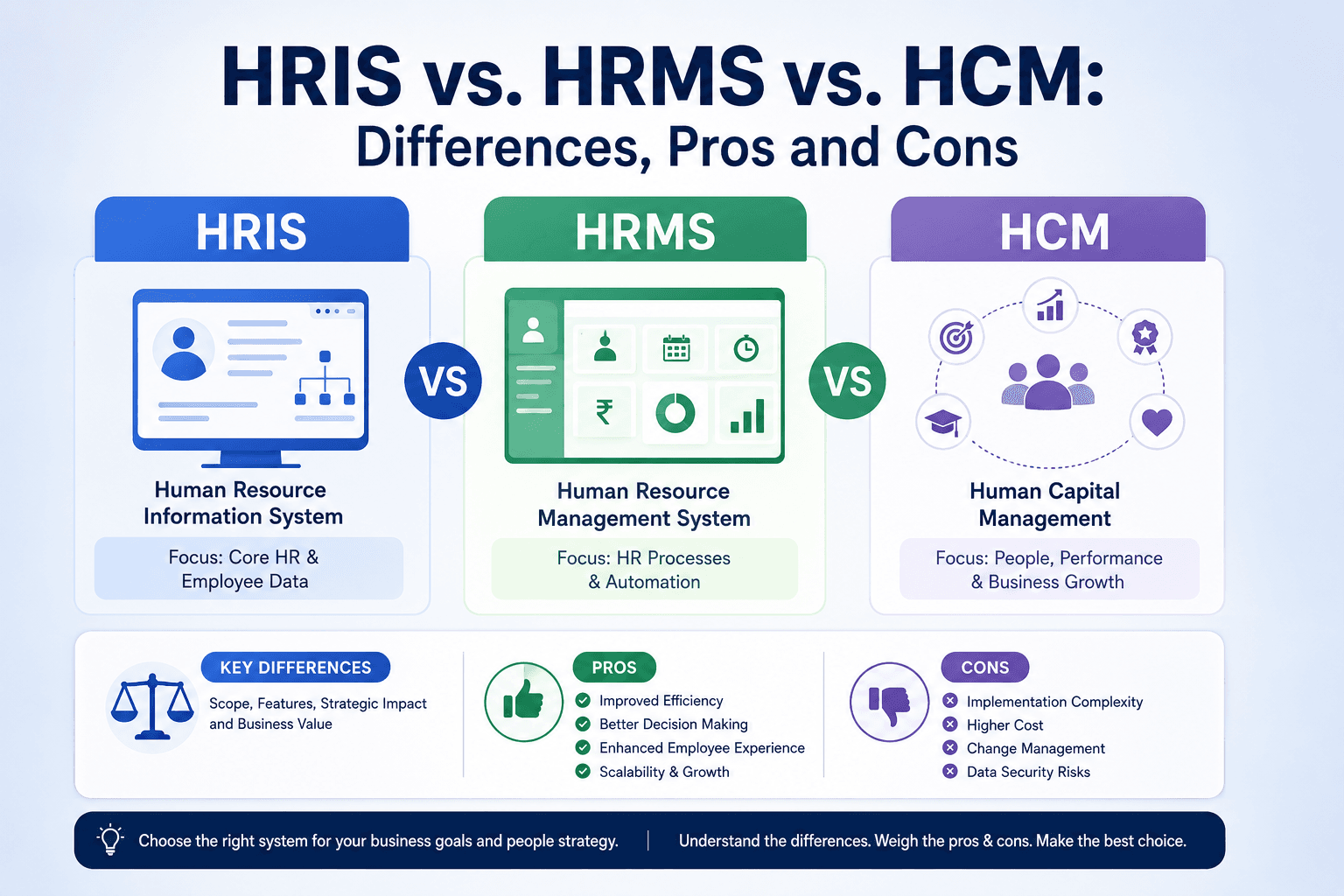
HRIS, HRMS and HCM are often used in organisations. There are subtle differences between these terms due to technological advancements.
Daily HR operations are necessary for ongoing business scalability and growth. HRIS, HRMS, and HCM are confusing and mean the same for HR. This confusion leads to buying the wrong HR tool.
The HR technology industry is transforming faster, and what was initially used for record keeping has changed to smart, modern platforms supported by AI intelligence. However, many organisations are struggling to choose the right software that aligns with their business requirements.
This comprehensive blog will explore the difference between these interchangeably used HR terms with their impact on the organisation, including advantages, disadvantages, what its core features are, and the right ways to choose an HR system for your organisation.
According to the Business Research Insights, Feb 2026 data, the global HR software market is expected to grow from $30.86 billion in 2025 to $89.12 billion by 2035, at a CAGR of 11.19%.
Before understanding the core features, let’s understand the definition of these terms in detail to avoid any confusion at the end.
What is HRIS?
HRIS, commonly known as Human Resources Information System, is a software solution that centralises, manages and automates core HR processes, employee data and policies. In simple words, it acts as a single, digital platform for managing tasks like payroll, benefits, administration, recruitment and attendance tracking for reducing manual paperwork and improving work efficiency.
Features of HRIS
HRIS systems are transactional and focus on gathering, updating and simplifying employee records systematically rather than driving strategic HR initiatives. Read the bullet points below to know HRIS features in detail:
Manages employee databases such as personal information, employment history and compensation.
Automatically process payroll without any errors.
Allows employees to view and manage their benefits.
Creates job postings, tracks applicants and handles onboarding.
Track employees' hours, attendance and time-off requests.
Provides an employee self-service portal to view and edit personal details.
Pros of HRIS
HRIS software offers diverse possibilities and functionalities such as:
Improves data efficiency and reduces paperwork
Provides HR analytics and reporting for metrics like headcount and turnover.
Help businesses to stay compliant with global labour and employment regulations.
Offer instant access to information through self-service portals
Cons of HRIS
The main risks associated with HRIS software are:
Evaluate your organisational requirements precisely and create an insecure technical specification.
Expensive for organisations due to several factors like purchasing software, licensing and training.
Risk of data breaches and privacy concerns regarding employees' sensitive data.
Continuous maintenance is required, especially for on-premise systems.
Limited customisation and integration, which is not suitable for specific company workflows.
Risk of system breakdowns, dependency on IT teams or inadequate software functionality to meet organisational-specific needs.
Common Challenges in Implementing HRIS Softwares
Technology and innovations have changed the way organisations work and process the operational workflow. Let’s understand some of the common challenges in implementing HRIS software with the help of an example:
Financial
A startup is struggling with the high per-user cost of maintaining the HRIS software. It makes the ROI difficult to justify in the short term.
Cultural
Due to the adaptability with the traditional methods, employees struggle to use the new self-service portals. They prefer to call HR for simple tasks like generating payslips and viewing leave balances.
Technical
While migrating from the outdated spreadsheet-based system to the new HRIS, data inconsistencies are common. It directly results in payroll errors.
Operational
HRIS software fails to provide the complete talent management analytics required by management. Organisations switch to a separate system for recruitment and talent management.
Subsequently, implementing an HRIS software involves high costs, data security risks, technical, operational and cultural challenges.
What is HRMS?
HRMS encompasses HRIS features to offer a comprehensive suite of software that manages internal HR functions. It acts as a centralised platform for streamlining the entire employee lifecycle, including hiring to retirement.
It functions by consolidating data from payroll, attendance and personal records into a single system to increase efficiency, reduce manual errors and provide actionable workflows.
Core Features of HRMS
HRMS comprises customisable options to align with the business requirements. From handling core HR operational tasks to managing employee data and analytics, HRMS provides a comprehensive solution for each company type.
Automates salary calculations, tax deductions, benefits administration, and compliance with the labour laws.
Handles the employee onboarding and offboarding workflows.
Tracks employee goals, 360-degree feedback and performance reviews.
Provides actionable insights on the workforce metrics like turnover rates, payroll costs and attendance trends.
Ensures adherence to regional labour laws and statutory regulations, which reduces the legal risk and penalties.
Advanced Features of HRMS
Manages training schedules, skill development and compliance training.
It has vast automation capabilities and integration options.
Automatically process data, process every detail, and process within an organisation.
Advantages of HRMS
For informed decision-making, it integrates with other platforms and generates analytics.
Provides a transparent visibility of teams, departments, and employees.
Robust reporting to managers and admins about the workflow management.
Offers learning and development opportunities to build skills.
Disadvantages of HRMS
It is more expensive than HRIS software.
Due to the complete configurations, it takes a long implementation time.
Organisations require an additional individual to train the employees.
It fails to manage the complete team member lifecycle like HCM.
What is HCM?
HCM refers to the Human Capital Management, which is a strategic approach to managing employees with the recruitment, onboarding, training and retaining talent. Overall, it balances logistical HR process and manages data with high-level strategy, planning and execution to handle the complete organisational workflow.
An HCM comprises numerous applications, including talent acquisition, onboarding, building company culture and career pathing. HCM system integrates with different data sources to create a complete, user-friendly, secure and compliant data source.
Which Features are Included in HCM?
HCM encompasses the basic features of both HRIS & HRMS and goes beyond talent acquisition, skill development and leadership planning. HCM integrates artificial intelligence with human capabilities to provide predictive analytics in HR. Read the features listed below about HCM software.
It streamlines a complete onboarding and recruitment HR process from hiring top-talent candidates to onboarding them.
Simplifies data management, ensures data integrity and provides access to important information for HR teams across India.
Manages payroll complex calculations, statutory deductions like PF, ESI, TDS, which adhere to labour laws.
Supports diverse tracking methods with geographical locations across remote or field workers.
Facilitates goal setting, 360-degree feedback and continuous performance appraisals.
Generates insights and reports with advanced tools and tracks key metrics like attrition, headcount and talent gaps.
Benefits of Choosing HCM
HCM offers different benefits to the organisation and the HR department. Let’s understand the key benefits of HCM in detail to innovate business operations in the modern workflow environment.
It manages the complete employee lifecycle from hiring to resignation.
With its strategic approach and predictive analytics, HCM improves employee retention and company culture.
Provides data-driven facts for informed decision-making.
It is scalable for sustainable growth.
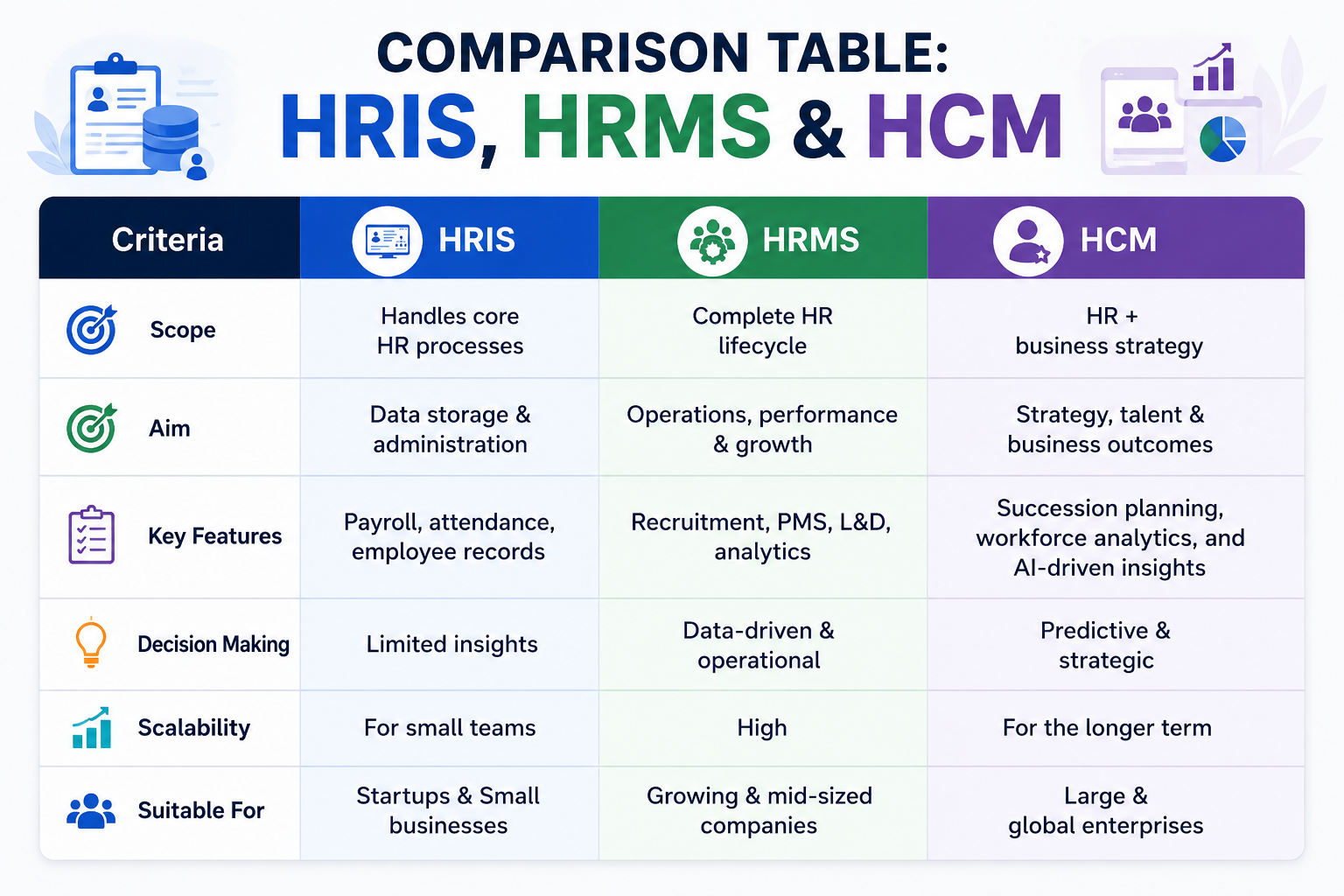
Why Companies are Choosing HRMS & HCM Over HRIS IN 2026?
With the technological advancements and changing workforce needs, organisations are choosing HRMS & HCM over HRIS. Companies no longer want an HR system that just tracks employees, but also one that grows business.
In 2026, HR stopped focusing on administrative work and started predictive analysis. Nowadays, organisations require:
Quicker hiring processes
Improved employee experiences
Continuous performance management
Live workforce insights
HRIS is incapable of meeting the organisational needs. Whereas modern software comes up with an integrated approach and AI capabilities at a centralised platform. The rise of AI, automation and hybrid work models creates a need for HRMS & HCM for managing a complicated workforce environment.
How to Choose the Right HCM Software for your Organisation?
When the business grows and HR tasks maximise, switching to the HCM is the better alternative to drive organisational success. Here are the steps to find the best HCM system below:
Define your Business Requirements & Goals
Before investing in HCM software, clearly define your specific needs from an HCM system.
Map out the key HR processes, organisation size and any challenges in operational workflow.
Properly Communicate With Key Stakeholders
Collaborate with the HR department and employees to align on organisational needs.
Plan a budget and discuss with the IT teams to review infrastructure, compatibility, data security needs and integration with existing systems.
Request for Proposals
Prepare a list of features and software requirements beforehand and send it to potential HCM vendors.
While sending an RFP, include essential details like organisation structure, size, number of employees, technical specifications, support service and budget constraints.
Request for case studies or social proofs to observe their capabilities and service.
Attend Demos & Request Free Trials
By attending demo sessions, you can get the software’s functionality and user-friendliness.
Ask the vendor how they handle the system with analytics and reporting.
How they handle data privacy and security, and how they integrate with other existing apps.
Follow Your Organisation's Vendor Approval Process
Every organisation has certain norms, operational values and technical requirements.
Involve your legal team in reviewing contracts and service level agreements (SLAs) to ensure all your terms meet the organisation's standards.
Avoid vendors who fail to provide detailed responses to your technical queries or the processes for successful implementation.
Complete the Final Sign-Off for Proposed HCM System
Get approval from seniors or decision makers, including HR executives, IT leaders, finance team.
Showcase detailed ROI analysis, and an overview of benefits for different departments and key takeaways from the software demos.
Answer all the questions about implementation costs, integration methods and data security concerns with existing systems.
Finalise the HCM implementation Plan
Develop a complete HCM implementation plan, including timelines, training assets, training schedules, testing plans and data migration.
Inform all about the implementation procedure to the stakeholders.
Gather regular feedback from the users, including the HR department and employees, about the HCM software.
Final Thoughts
Organisation’s struggle, goals and visions define whether an HRIS, HRMS, or HCM software is the right choice. If you need a secure place to store an employee's data or identify the top trends and patterns, review the data point along with your team members' lifecycles.
If you’re confused about choosing the best software, always map out your business needs and requirements and keep your people first.
Looking for the HR software that can automate your entire HR operations. Human Maximizer is the complete solution for streamlining repetitive tasks and offering a scalable solution that helps in predictive data analysis, employee data management and engagement to promote a healthy and positive company culture.
Frequently Asked Questions
What is the difference between HRMS and HCM?
HRMS and HCM are often used interchangeably, but HCM is a more comprehensive, strategic and often cloud-based suite that focuses on optimising the complete employee life cycle.
HRMS automates administrative tasks such as HR functions and payroll. Whereas HCM focuses on talent management, strategic planning and advanced analytics.
Is HRIS the same as HRMS?
No, HRIS and HRMS may seem the same, but their core functions are different from each other. HRIS handles data administration, payroll and compliance. On the other hand, HRMS is more comprehensive and includes advanced talent management and strategic tools with predictive analytics.
Which is better for a mid-sized company: HRIS or HCM?
For a mid-sized company, HCM is the best alternative for strategic growth, talent management, and managing complex international compliance. If the organisation’s priority reflects core administrative tasks and payroll calculation at a lower cost, then consider HRIS for handling organisational HR operations.
When should an HR leader switch from HRIS to HCM?
HR leaders should switch from HRIS to HCM when they need a transition from record keeping and tracking data to a strategic workforce management that includes AI and human augmentation for a sustainable decision-making process with advanced analytics.
How to choose between HRMS, HRIS, and HCM in 2026?
If you’re confused in choosing between these HRMS, HRIS and HCM, then outline the company size, goals, automation needs and strategic planning.
You can choose HRIS for basic data management and processing payroll. HRMS for automating employee lifecycles and workflows, and HCM for complete, strategic and international talent management.
Related reading
Keep reading

Compliance
The Complexity Tax: Choosing the Best HRMS Software in India
Why bloated all-in-one HRMS software creates a hidden complexity tax that drains your team's productivity and how to streamline your HR operations...
16 min read
Compliance
HRMS software for business growth: Beyond Compliance
Why Indian CHROs are shifting from compliance to capital. Learn how to leverage HRMS software for business growth and turn HR into a P&L driver today.
14 min read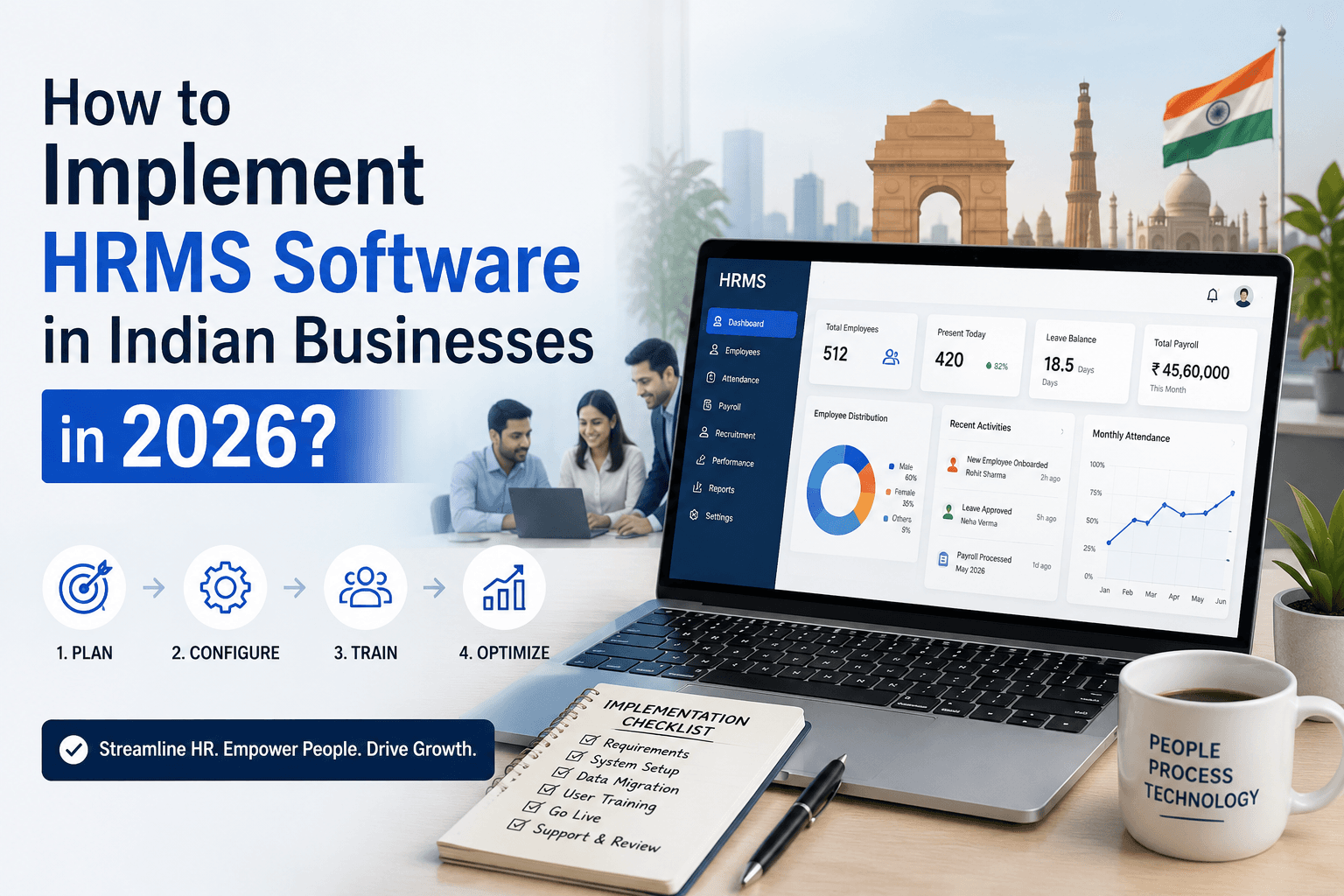
HR Strategy
How to Implement HRMS Software in Indian Businesses in 2026?
Failing to implement HRMS? Find out how long HRMS implementation takes to automate payroll, compliance & improve employee experience. Book a demo with Human Maximizer.
5 min read